
SEO analysis overview
Run on-page and Search Console-aware SEO analysis from the SEO Booster metabox, then clear findings in SEO Possibilities.
Feature page · Keywords tab (GSC) · AI Readiness
When editing a page with SEO Booster installed you can scroll down to the metabox named SEO Booster.
For sitewide prioritized issues, see SEO Possibilities.
The SEO Analysis feature tests your content from basic SEO elements through technical factors and Google Search Console insights when connected.
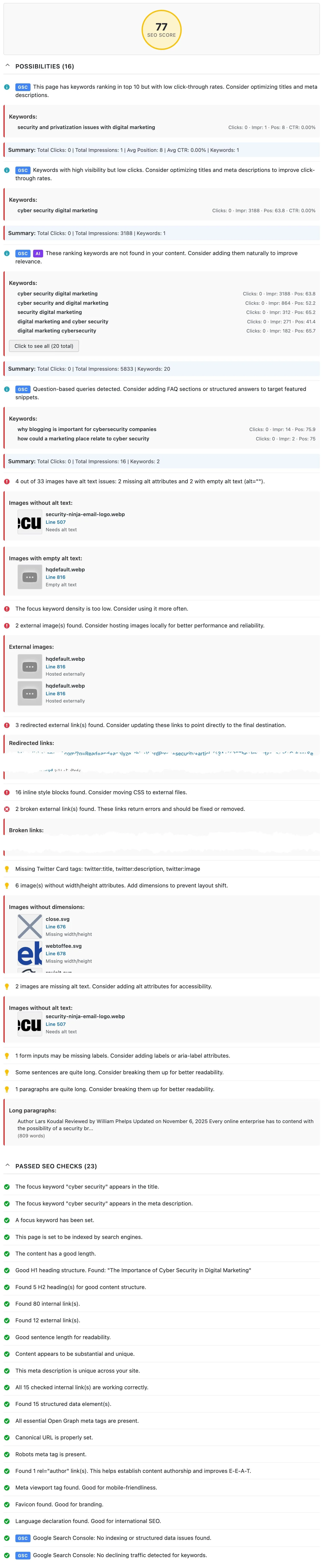
Metabox layout
The SEO Booster metabox has:
- Page settings (always visible above the tabs): detected SEO plugin and focus keywords, Automatic Linking, and Exclude from SEO Analysis
- Analysis tab: score, possibilities, passed checks, AI Readiness, and full-page review
- AI tools tab: optional AI suggestions (when a provider is configured), plus Ask about this page (free with Connectors or Credits). Dashboard Ask about your SEO is Pro.
- Keywords tab: Search Console queries for this URL (loaded on demand), see Keywords tab (GSC)
SEO Score
On the Analysis tab, you’ll see a circular score indicator showing your overall SEO score as a percentage. The score is color-coded:
- Green (80-100%): Excellent SEO optimization
- Yellow (60-79%): Good, with room for improvement
- Red (0-59%): Needs significant SEO work
The score is calculated from errors, warnings, opportunities (improvements), and good practices. Details: Understanding SEO Analysis Results.
Block editor: The SEO Booster sidebar also shows an AI Readiness checklist and score derived from the same analysis data.
Analysis Results
Below the score on the Analysis tab, you’ll see the analysis results organized into:
Possibilities (Issues & Opportunities)
Findings are marked with severity levels:
- Critical / Error: Fix first (for example missing title, broken links)
- High / Warning: Important issues (for example focus keyword not in title)
- Opportunity: Softer suggestions and many GSC-driven ideas (for example multiple H1, external images, low CTR in top 10)
Good
Positive SEO elements that are properly implemented on your page.
Site-level items such as favicon, language, viewport, Twitter Cards, and homepage contact info appear under Sitewide possibilities on the SEO Possibilities page, not as one row per URL.
Running an Analysis
On the Analysis tab, click SEO review entire page when it is shown. The button appears when the page has not been analyzed yet, or after a content-change warning (alongside Reanalyze). This will:
- Download the full rendered page (including widgets, footer, and theme elements)
- Run comprehensive SEO tests on the complete page output
- Display all findings in the results section
The analysis includes both the post content and the full page as it appears to visitors and search engines.
What Gets Checked
SEO Analysis runs many grouped tests across:
Basic SEO Elements
Title tag, meta description, focus keyword usage, and noindex status
Content Quality
Content length, heading structure (H1, H2), excerpts, featured image, FAQ-style headings, and readability. Keyword density is not scored.
Technical SEO
Image ALT text, internal and external links (including broken and redirected checks on full-page review), structured data, canonical URLs, robots meta, Open Graph, and more
Sitewide (on SEO Possibilities)
Favicon, language, viewport, Twitter Cards, contact info, SSL, robots.txt, sitemap, llms.txt, and related global checks
Google Search Console Integration
When Search Console is connected:
- Keywords with low click-through in strong positions (CTR as a fraction, with an adaptive impression floor)
- High impressions but low clicks
- Keywords not found in your content
- Keyword cannibalization
- Long-tail and question-based queries
- Content freshness when traffic is declining
For the full list, see: Complete List of SEO Tests
Old Results & Reanalysis
When you open a page that has been analyzed before, SEO Booster loads the previous analysis results so you can see your score and issues without waiting.
Content Change Detection
If you’ve changed the page after the last analysis, you’ll see a yellow notice:
Content has changed. Click to reanalyze.
Click Reanalyze in the notice for a fresh run. When that warning is shown, SEO review entire page is also available on the Analysis tab.
Bulk analysis
You can analyze multiple posts or pages at once from the WordPress list screen:
- Go to Posts or Pages in your WordPress admin
- Select the posts/pages you want to analyze
- Choose SEO Analysis (SEO Booster) from the Bulk Actions dropdown
- Click Apply
A progress banner processes each selected post sequentially via AJAX in the browser (not as a background Action Scheduler queue). You can cancel mid-run; completed posts keep their analysis.
Full details: Bulk SEO analysis.
Note: Only posts that are not excluded from analysis are processed. Private posts and WooCommerce special pages (cart, checkout, etc.) are automatically excluded.
How to hide/show the metabox
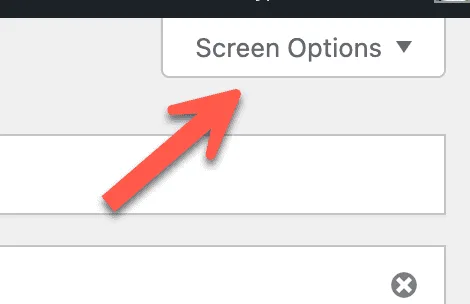
In editing mode, use Screen Options (top right) to hide or show the SEO Booster metabox.
Understanding Your Results
For interpreting scores and fixing common issues, see: Understanding SEO Analysis Results
Browse topics