
SEO Metabox on the Edit Screen
Open any post, page, WooCommerce product, category, or tag and SEO Booster adds one metabox with a live SEO score, prioritized fixes, full-page analysis, AI suggestions when you want help, and the Search Console keywords that URL already ranks for.
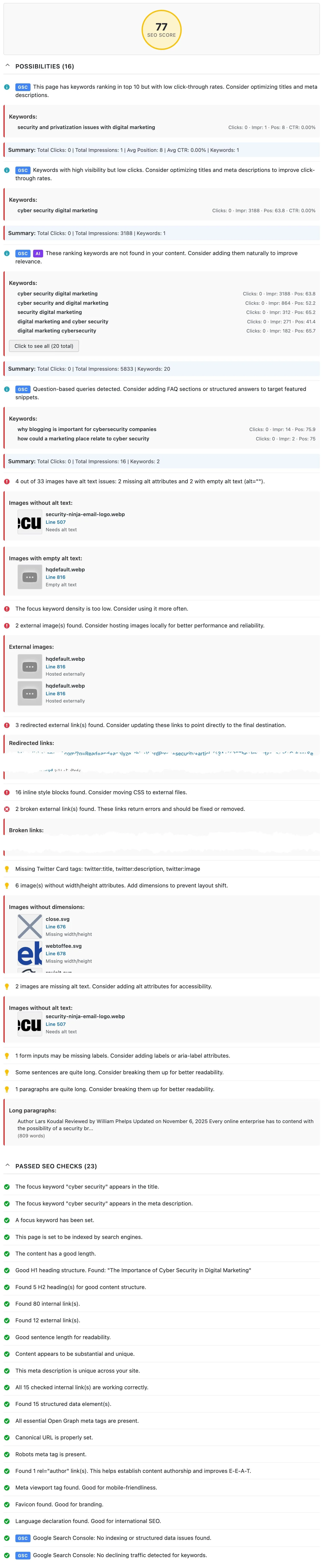
Part of the seo booster plugin.
Works with your SEO plugin, and makes it smarter.
Keep the SEO plugin you already use. We add Search Console context, a clear fix list, automatic links, and tools that write into the meta you already have. Works with Yoast, Rank Math, AIOSEO, SEOPress, and TSF.
- Yoast SEO
- Rank Math SEO
- All in One SEO (v4+)
- SEOPress
- The SEO Framework (v5+)
Two questions, one metabox
What is it?
Live SEO score, prioritized fixes, full-page analysis, AI tools, and per-URL GSC keywords in one SEO Booster metabox on the WordPress edit screen.
Who is it for?
Content editors who optimize pages while they write, on posts, products, categories, and tags.
What does it solve?
Tab-switching between analysis tools and Search Console when updating a single URL.
Why the edit screen matters
Fix in context
Score, issues, and the keywords a page ranks for sit beside the content you are editing, so you change the right words immediately.
Find hidden gems
Filter to keywords not used in content to surface terms you already rank for but never mention: easy wins hiding in your impressions.
Rescue wasted impressions
Filter to keywords with no clicks to find high-impression, zero-click queries and rewrite the title or meta to earn the visit.
What's on the edit screen
Page settings
Always visible above the tabs so important controls stay in reach.
- Detected SEO plugin and focus keyword(s)
- Automatic Linking: enable or disable per post
- Exclude from SEO Analysis: skip a page; cart/checkout/private auto-excluded
Analysis tab
Score, issues, AI Readiness, and full-page review in one place.
- SEO Score: 0–100 with a color-coded ring and last-analyzed time
- Possibilities: prioritized issues for this page
- Passed SEO checks and AI Readiness checklist
- SEO review entire page: shown when needed (not analyzed yet, or after content-change warnings)
Keywords tab
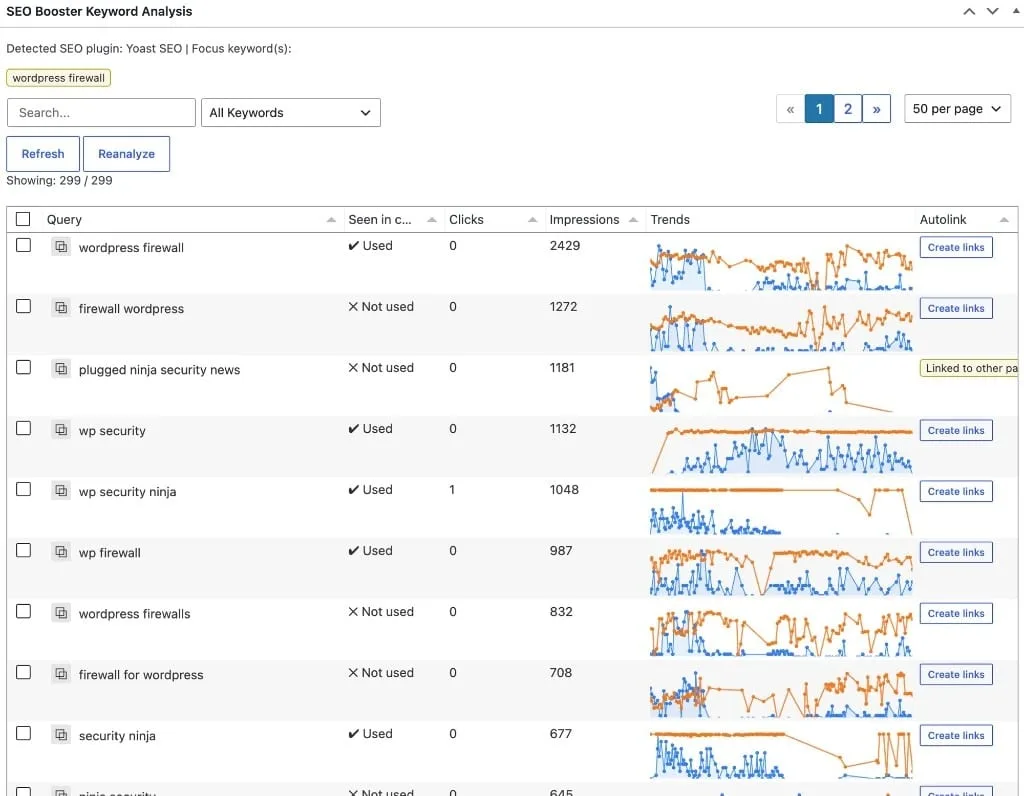
Search Console queries for this URL, loaded on demand.
- Click Load Keyword Analysis Data to fetch the table and charts
- Query, Seen in content, Clicks, Impressions, CTR, Position, Trends
- Filters: no clicks (CTR gaps), not used in content (hidden gems), used in content
- Reanalyze, refresh, copy; Pro adds autolink status per keyword
AI tools tab
When WordPress Connectors is configured, Ask about this page and title/meta suggestions work in the editor. Comprehensive analysis and Generate Product SEO appear when Credits is selected.
- Ask about this page: chips and free text (Connectors or Credits; applying a focus keyword or autolink is Pro)
- Generate AI SEO suggestions: 5 titles and meta descriptions
- Comprehensive analysis and Generate Product SEO: Credits only
- Saved suggestions open expanded
How to optimize a page
Open the SEO Booster metabox
Posts, pages, products, categories, and tags show one SEO Booster metabox (enable via Screen Options if hidden).
Run SEO review entire page
On the Analysis tab, get a score plus prioritized possibilities based on the full rendered page (shown when the page needs analysis).
Load keyword analysis
Open the Keywords tab and click Load Keyword Analysis Data to see Search Console queries sorted by impressions.
Mine the filters
Use the not used in content filter for hidden gems and no clicks for CTR rewrites.
Apply fixes (AI can help)
Update titles, meta, and body, or open the AI tools tab to generate suggestions when AI is configured.
Frequently Asked Questions
Where do these tools appear?
On the WordPress edit screen for posts, pages, WooCommerce products, categories, and tags, in one SEO Booster metabox with Page settings and tabs for Analysis, AI tools, and Keywords. Enable it via Screen Options if hidden. Other taxonomies may still show a standalone GSC Keywords panel only.
What are hidden gems?
Queries the page already earns impressions for but where the term never appears in your content. Filter the keyword table to Keywords not used in content to find them, then work the phrase into the page naturally.
Does the SEO score analyze my theme too?
Yes. SEO review entire page (on the Analysis tab, when shown) downloads the full rendered output, including theme markup, widgets, and footer: so checks like H1 detection reflect what visitors and Google actually see.
Do I need Google Search Console?
The SEO score and on-page checks work without it. The Keywords tab needs Search Console connected and data imported for that URL.
Do I need AI?
No. Scoring, full-page analysis, and keyword insights work without AI. AI can help on the AI tools tab via WordPress 7+ Connectors or SEO Booster Credits when you want it. Run quick review is in the block editor sidebar.
How is this different from SEO Possibilities?
The edit screen optimizes one page in context. SEO Possibilities is the sitewide, prioritized queue across every analyzed URL.
Boost your rankings with smarter SEO
Connect Google Search Console, fix pages from real search data, automate internal links, and use AI when the repetitive work piles up.
Get Started