
Weekly Email Report
Enable the SEO weekly report in SEO Booster → Settings → Email & Reports. Each message puts Search Console momentum, open SEO Possibilities, and new ranking terms in one scan, so you open WordPress when something actually needs work.
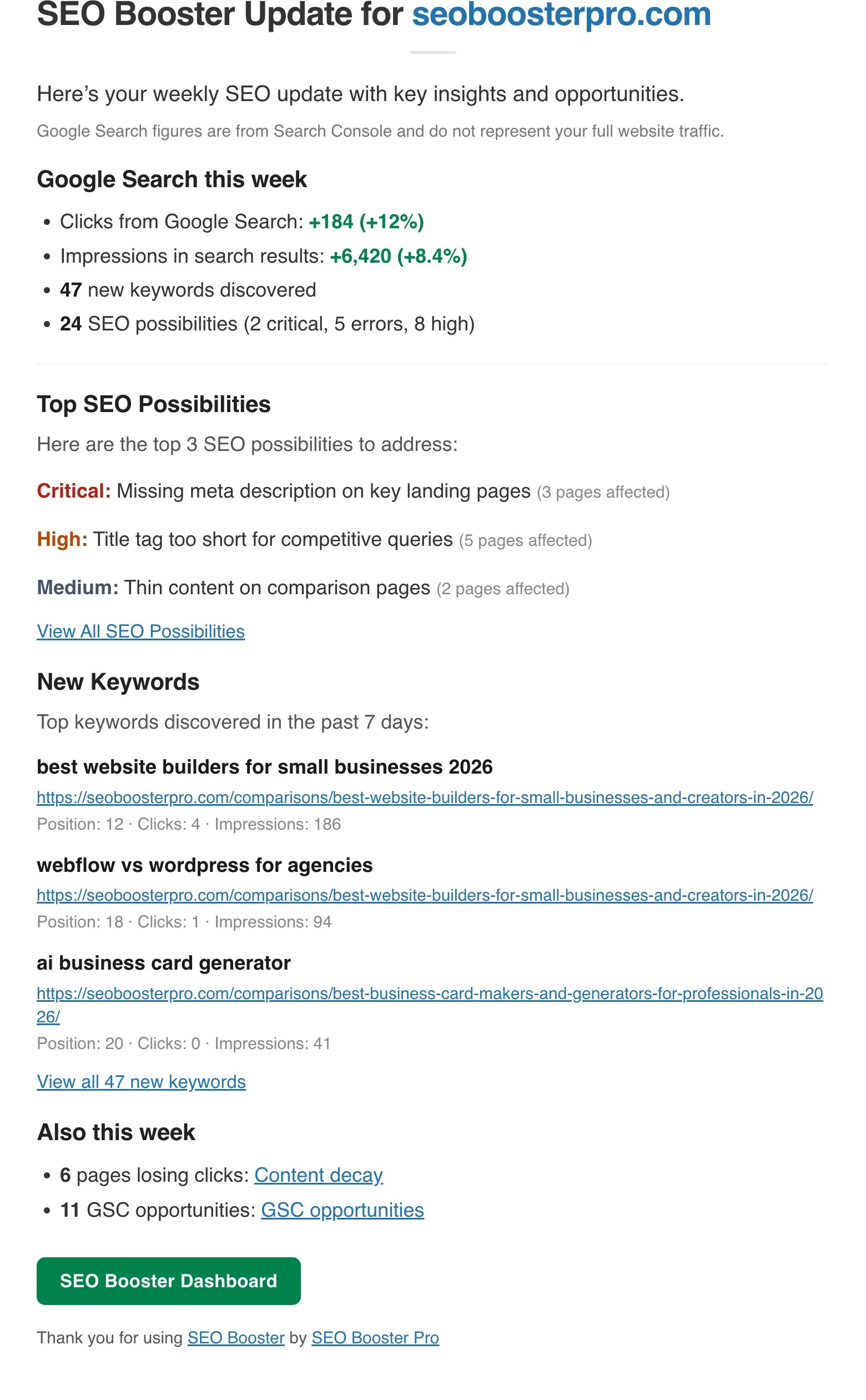
Part of the seo booster WordPress plugin.
Works with your SEO plugin, and makes it smarter.
Keep the SEO plugin you already use. We add Search Console context, a clear fix list, automatic links, and tools that write into the meta you already have. Works with Yoast, Rank Math, AIOSEO, SEOPress, and TSF.
- Yoast SEO
- Rank Math SEO
- All in One SEO (v4+)
- SEOPress
- The SEO Framework (v5+)
SEO weekly report in your inbox
What is it?
A GSC-backed email from your site each week. Skim clicks and impressions, open SEO Possibilities, new keywords, and (on Pro) Tools signals like content decay.
Who is it for?
Site owners, freelancers, and agencies who want a quick overview without logging into WordPress every day.
What does it solve?
Dashboard fatigue. Spot wins, risks, and new keywords early in minutes, then jump straight to the pages that need attention.
Key benefits of weekly SEO email
Know if search is rising or cooling
Week-over-week clicks and impressions show direction before rankings slip, so you react while there is still time.
Act on the few issues that matter
Top SEO Possibilities surface high-severity gaps with how many pages they affect, so you fix impact first.
Catch new keywords early
New keywords from the past 7 days show where Google is starting to notice you, before competitors dig in.
What each weekly email contains
Google Search this week
When Search Console history exists, the email opens with a short pulse comparing the latest 7 days to the previous 7 days.
- Clicks and impressions: absolute and percentage change, so you see demand rising or cooling at a glance
- New keywords discovered in the past 7 days, so emerging queries do not get ignored
- Open SEO Possibilities count, with critical, error, and high severity when present
- Figures come from imported Search Console data, not your full analytics stack
Top SEO Possibilities
Up to three grouped possibilities with severity, a plain-language message, and affected page count. Open the full list in WordPress when you are ready to fix.
- Prioritize Critical and High items that touch the most pages
- Use the View All link when you want the complete queue
- Turn email into concrete on-page fixes without hunting through reports
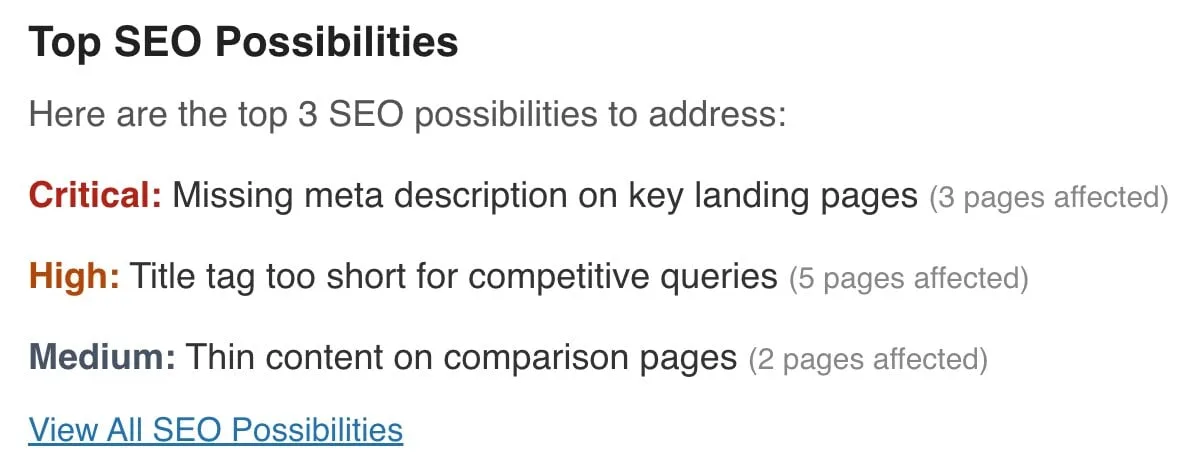
New keywords section
Top three new keywords from the past 7 days with query, landing page URL, position, clicks, and impressions. When more exist, jump to GSC Overview for the full list.
- Spot new keywords early while positions are still climbing
- Decide which pages deserve a refresh, stronger titles, or internal links
- Share concrete wins with clients or teammates without exporting spreadsheets
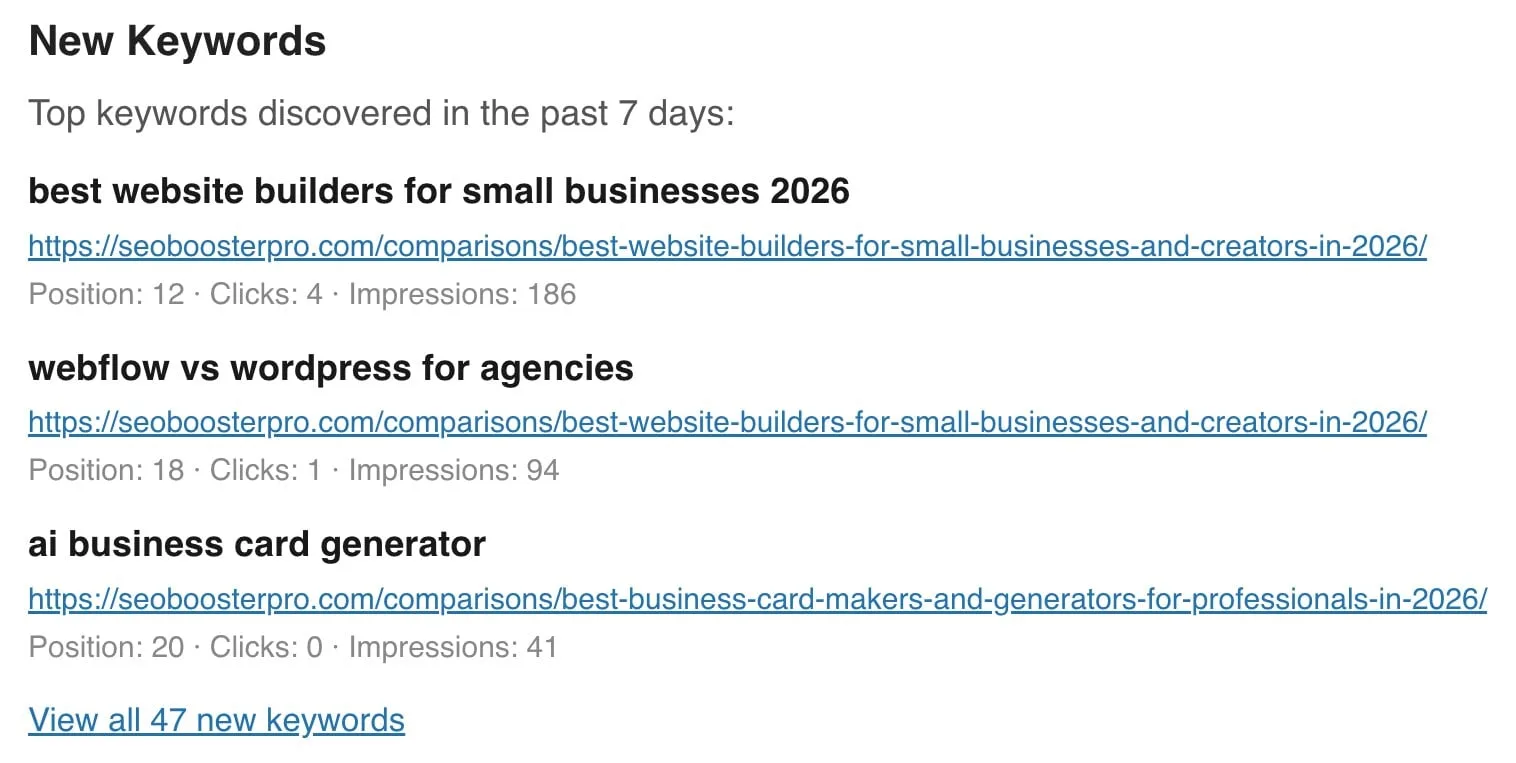
Also this week (Pro)
On Pro, when Content decay or GSC opportunities exist, the email adds an Also this week section with deep links into Tools.
- Pages losing clicks: open Content decay and refresh what is slipping
- GSC opportunities: jump into opportunity batches for titles and meta that can win more clicks
- Notice Pro Tools signals without opening every Tools tab every week
How to set up weekly email
Enable and set recipients
SEO Booster → Settings → Email & Reports → enable Weekly Email Reports and enter recipient(s). Comma-separated addresses are supported.
Send a test
Use Send Email Now on the settings page to preview the latest template without waiting for the cron schedule.
Act on the summary
Use week-over-week deltas to decide whether to refresh content, fix Possibilities, or investigate new keywords in GSC Overview.
Pro, follow Also this week
When Content decay or GSC opportunities appear, open those Tools tabs from the email and fix the pages that need attention first.
Trusted by WordPress site owners
“As an e-commerce business, SEO Booster Pro has saved us hours of work while improving our rankings. The automated internal linking and 404 error monitoring are invaluable.”
Sophia Kim
Head of Growth, UrbanStyle Co.
Frequently Asked Questions
What is included in the weekly SEO email?
Google Search this week (clicks and impressions vs the prior 7 days when history exists), new keyword count, top SEO Possibilities (up to three), a New Keywords section with up to three examples, and on Pro an Also this week block for content decay and GSC opportunities when those signals exist. Data reflects imported GSC data, not full site analytics. Section-by-section actions in the Weekly SEO report for WordPress guide.
Where do I enable weekly email?
SEO Booster → Settings → Email & Reports. Toggle Weekly Email Reports, set recipients, and optionally send immediately with Send Email Now.
How often are emails sent?
Weekly on the plugin cron schedule. The settings page shows the next scheduled report date when enabled.
Can I customize which sections appear?
Section content is fixed: there is no per-section toggle. You can enable or disable the entire email and change recipients. Pro Also this week only appears when decay or opportunity counts are greater than zero.
Does the email include cannibalization or ranking anomaly tables?
The current weekly template focuses on the Search Console pulse, SEO Possibilities, new keywords, and Pro Also this week. For cannibalization, use GSC Overview row indicators or SEO Possibilities GSC checks.
Are 404 alerts included in the weekly email?
Not in the current weekly email template. 404 monitoring and the searchable 404 report are Pro features in the plugin (Settings and 404 & Redirects). The email’s Pro section highlights Content decay and GSC opportunities instead.
Boost your rankings with smarter SEO
Connect Google Search Console, fix pages from real search data, automate internal links, and use AI when the repetitive work piles up.
Get Started