
Entity Map
SEO Booster → Tools → Entity Map publishes a curated map of your organization and important content as machine-readable JSON and human-readable HTML. AI can help draft and refine entities. Publish live when you are ready.
Part of SEO Booster.
Works with your SEO plugin, and makes it smarter.
Keep the SEO plugin you already use. We add Search Console context, a clear fix list, automatic links, and tools that write into the meta you already have. Works with Yoast, Rank Math, AIOSEO, SEOPress, and TSF.
- Yoast SEO
- Rank Math SEO
- All in One SEO (v4+)
- SEOPress
- The SEO Framework (v5+)
Tell AI systems who you are, not only where to start
What is it?
A Pro Tools feature that serves /entitymap.json and /entitymap.html from WordPress, following the open EntityMap v1.0 standard so LLMs and answer engines understand your organization, products, and content relationships.
Who is it for?
WordPress site owners who already use llms.txt or AI bot tracking and want a structured identity layer beyond a link list, especially publishers, shops, and businesses with rich content libraries.
What does it solve?
llms.txt points AI to your best pages. Entity Map explains who you are, how entities relate, and which sources back each claim, with discovery signals in llms.txt, robots.txt, and head links you can turn on.
What you get
Curated from real site data
Build drafts from ranked GSC pages and AI bot traffic, including crawl-gap suggestions from pages bots already fetch.
Editable entities and relations
Review names, descriptions, source chunks, and predicates. Lock entities AI should not overwrite. Pin pages from bot gaps.
Live JSON and HTML endpoints
Publish /entitymap.json for machines and /entitymap.html for humans. Nothing goes public until you enable serving and save.
Discovery and AI Readiness
llms.txt Structured knowledge section, robots.txt EntityMap line, and sitewide AI Readiness checks when the map is live (turn on if you want).
AI help for setup
Generate with AI for a full draft, then Improve with AI or Review with AI while editing. WordPress Connectors or SEO Booster Credits when configured; site-data builds work without AI.
EntityMap v1.0 compliant
Output follows the open entitymap.org standard; validate live JSON at entitymap.org/validate before sharing with partners or AI pipelines.
Entity Map in Tools
Draft with AI, refine, then publish
Path: SEO Booster → Tools → Entity Map. Three steps: draft, edit, then publish live.
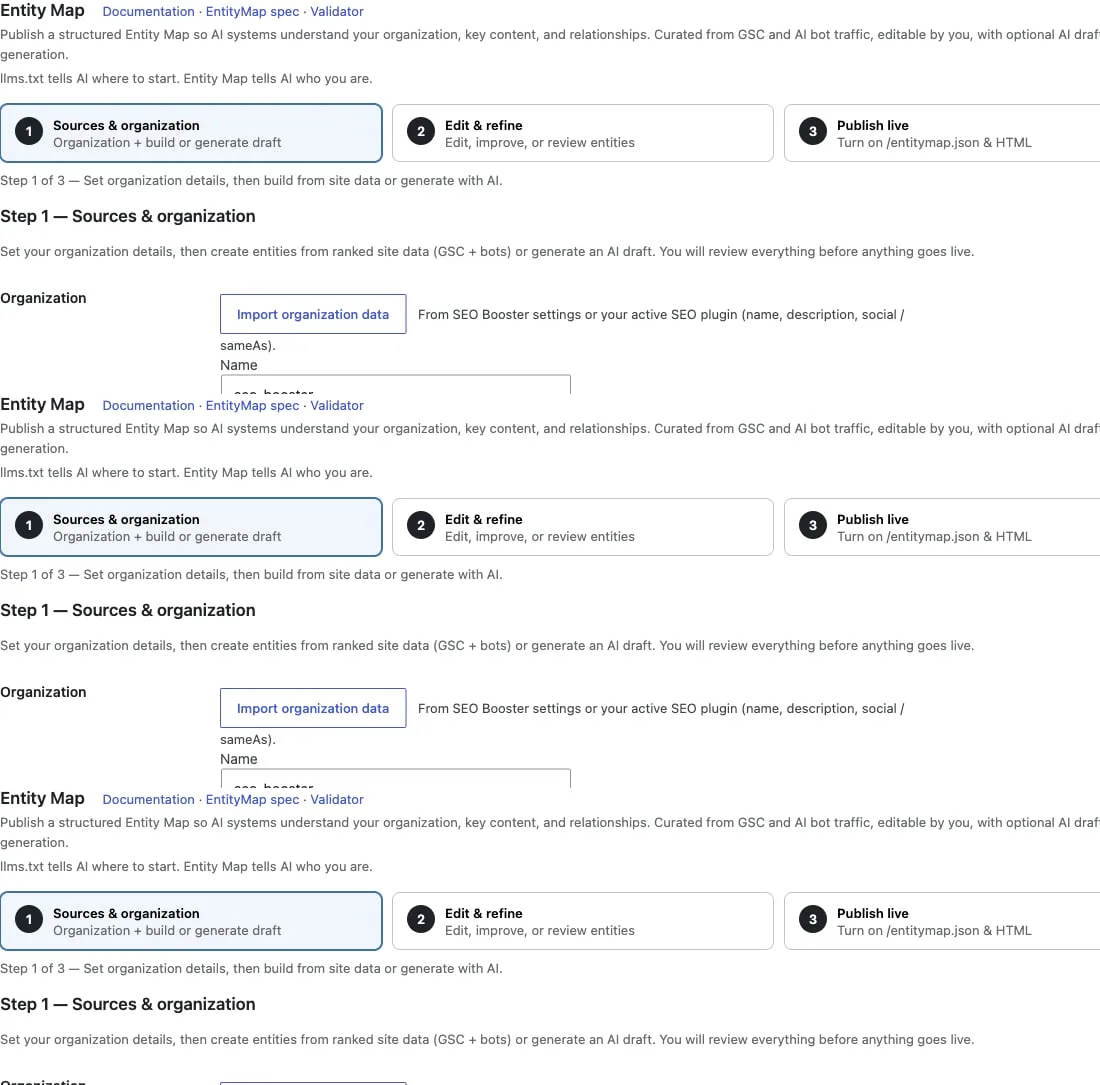
- Start with organization details, then Build from site data or Generate with AI, still a private draft
- Edit & refine: Improve with AI, Review with AI, relations, short source excerpts, locks, and bot crawl-gap pins
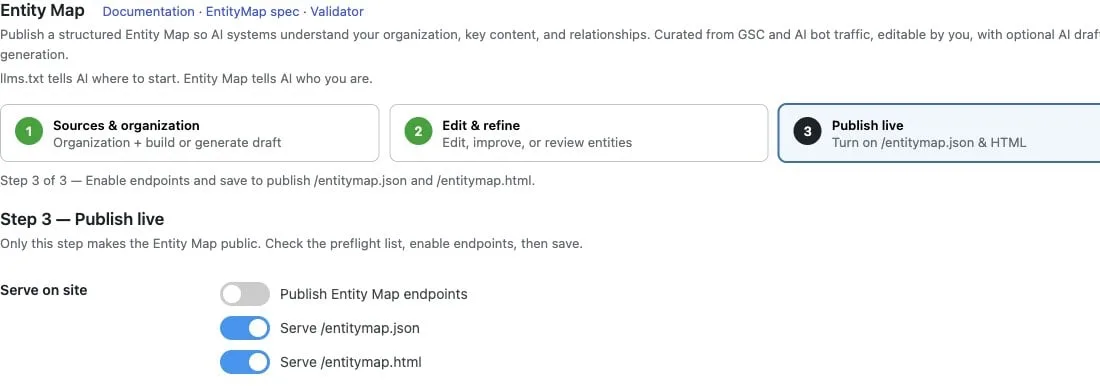
- Publish live: enable /entitymap.json and/or /entitymap.html, discovery toggles if you want, validate at entitymap.org
Endpoints and validation
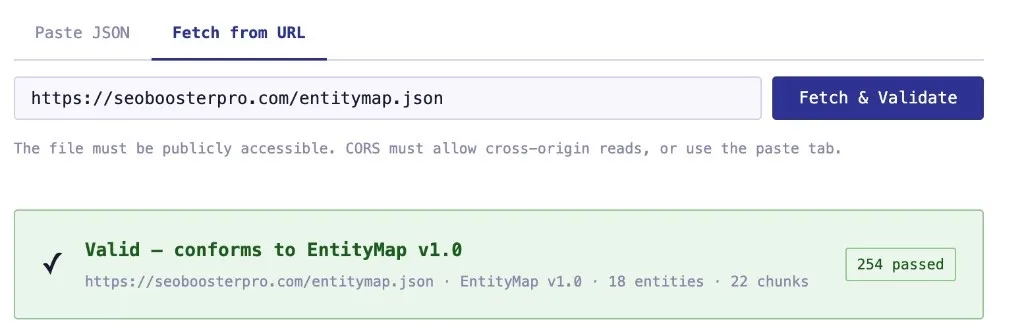
Endpoints are served dynamically, like /llms.txt. Use the official EntityMap validator to confirm your live JSON before sharing it with partners or AI pipelines.
- /entitymap.json for AI systems and RAG pipelines
- /entitymap.html for human review and internal QA
- Paste JSON or fetch your public URL at entitymap.org/validate
- Live example on this site: /entitymap.json and /entitymap.html
How to publish Entity Map
Open Tools → Entity Map (Pro)
Connect GSC and enable AI bot tracking first if you want ranked pages and crawl-gap signals in the draft builder.
Sources & organization
Set organization details, then Build from site data or Generate with AI. Sync llms.txt curation rules when it fits your workflow.
Edit & refine
Refine descriptions with Improve with AI or Review with AI, add relations, pull source chunks, and lock anything that must stay human-owned.
Publish and validate
Pass the preflight checklist, enable JSON/HTML serving, save, open live URLs, and validate at entitymap.org. AI Readiness updates on the next analysis run.
Frequently Asked Questions
What is Entity Map?
Entity Map is an open standard for publishing structured knowledge about your organization and website. SEO Booster Pro serves /entitymap.json for AI systems and RAG pipelines and /entitymap.html for human review. The map lists key entities, typed relationships, and extractive evidence chunks with publisher attribution so consumers understand who you are and what you know, not only which URLs exist.
What are /entitymap.json and /entitymap.html?
/entitymap.json is the machine-readable EntityMap v1.0 file at your site root. /entitymap.html is the companion human-readable view generated from the same data. SEO Booster publishes both dynamically from Tools → Entity Map when serving is enabled. Validate live JSON at entitymap.org/validate before sharing with partners or AI pipelines.
How is Entity Map different from sitemap.xml or schema.org?
Sitemaps list URLs; schema.org markup describes individual pages. Entity Map declares site-wide entities, typed relationships, and evidence chunks in one index, what your organization covers and how concepts connect across the site. It complements sitemaps and page-level schema; it does not replace them.
What is the difference between llms.txt and Entity Map?
llms.txt is a curated starting index for AI crawlers (free). Entity Map (Pro) publishes structured organization and content relationships as /entitymap.json and /entitymap.html so systems understand who you are, not only where to begin. SEO Booster can link both via discovery signals in llms.txt and robots.txt.
How do I publish Entity Map on WordPress?
Open SEO Booster → Tools → Entity Map (Pro). Set sources and organization, build from GSC and AI bot data (AI can help when you want), edit and refine entities, enable JSON and/or HTML serving under Publish live, then save. See the step-by-step Entity Map guide for screenshots and validation tips.
Is Entity Map included in the free plugin?
No. Free installs keep llms.txt and AI bot tracking. Pro unlocks the Entity Map Tools tab, build/edit/publish workflow, and live endpoints.
Do I need AI configured?
No. Building, editing, and publishing work without AI. Optional Generate / Improve / Review with AI use WordPress Connectors or SEO Booster Credits when configured.
How does AI bot tracking help?
Crawl data surfaces pages bots already visit and gaps you can pin into the map, so curation reflects real AI interest on your site.
What standard does the output follow?
EntityMap v1.0 (entitymap.org/spec/v1.0), including chunk publisher attribution, entity types, predicates, and robots.txt discovery you can turn on.
Can a physical file block the virtual endpoints?
Yes. If entitymap.json or entitymap.html exists in the WordPress web root, many hosts serve that file directly. Remove or rename it to use SEO Booster dynamic serving.
Boost your rankings with smarter SEO
Connect Google Search Console, fix pages from real search data, automate internal links, and use AI when the repetitive work piles up.
Get Started