
Tools
SEO Booster → Tools is one place to scan many pages and fix them in batches. Free tabs cover bulk meta, image metadata, and llms.txt. Pro tabs add Entity Map, needs analysis, content decay, GSC opportunities, focus keywords, and autolink opportunities, plus Markdown / llms-full on the llms.txt tab.
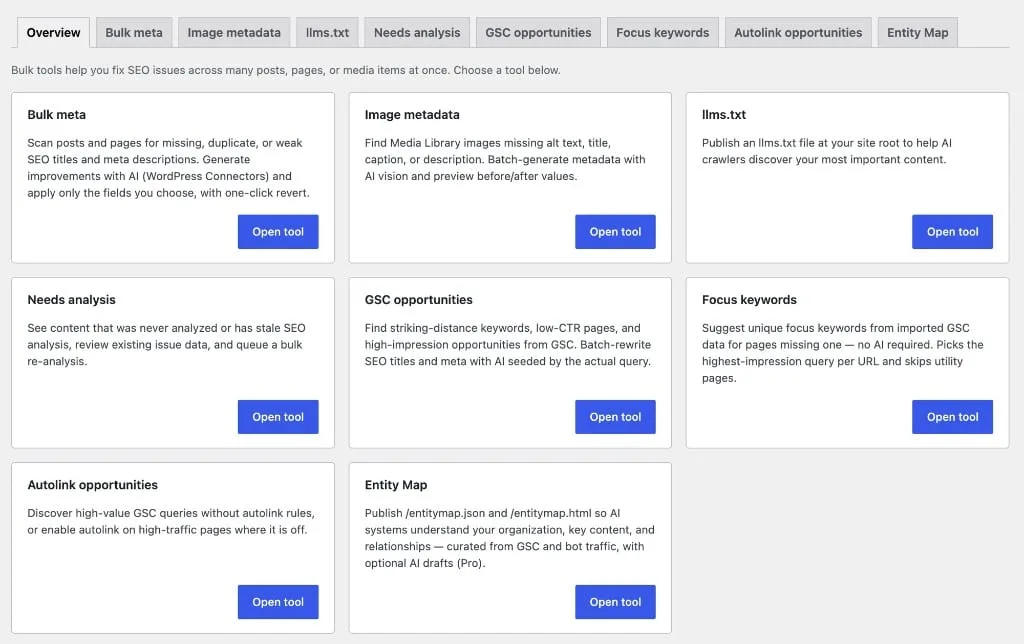
Part of the seo booster plugin.
Works with your SEO plugin, and makes it smarter.
Keep the SEO plugin you already use. We add Search Console context, a clear fix list, automatic links, and tools that write into the meta you already have. Works with Yoast, Rank Math, AIOSEO, SEOPress, and TSF.
- Yoast SEO
- Rank Math SEO
- All in One SEO (v4+)
- SEOPress
- The SEO Framework (v5+)
Scan once, fix many
What is it?
Admin tools that find missing meta, empty alt text, GSC opportunities, and autolink gaps, then run batch jobs with live progress.
Who is it for?
Multi-page sites and agencies cleaning up hundreds of URLs without opening each edit screen.
What does it solve?
One-by-one manual fixes. Scan many pages, apply batch changes, and revert the last run if needed.
What each tab does
Overview (free)
Start tab with quick links to every tool and at-a-glance batch status. See what needs attention across the site.
Bulk meta (free)
Find missing or duplicate SEO titles and descriptions, or meta missing focus/GSC keywords. Generate replacements with WordPress Connectors or SEO Booster Credits when you want AI help.
Image metadata (free)
Scan for empty alt, title, caption, or description on media library items. Batch-fill with AI or manual patterns.
llms.txt (free)
Generate and preview /llms.txt for AI crawlers. Curates public URLs (prefers top GSC pages when data exists). Serve dynamically so AI knows where to start.
Entity Map (Pro)
llms.txt tells AI where to start. Entity Map tells AI who you are. Publish /entitymap.json and HTML from a Build → Edit → Publish wizard, curated from GSC and AI bot traffic.
Needs analysis (Pro)
Find URLs never analyzed, stale after 90+ days, or with open issues from the last run. Queue them for SEO review.
Content decay (Pro)
Find URLs losing Search Console clicks comparing the latest 30 days to the prior 30 days. Prioritize page refreshes before rankings slip further.
GSC opportunities (Pro)
Scan striking-distance positions (4–20), low CTR in top 10, or high impressions with low clicks. Batch-rewrite meta per page cluster with AI.
Focus keywords (Pro)
Suggest unique focus keywords from GSC for pages missing one. Pick from up to 10 options, edit before apply, revert last batch.
Autolink opportunities (Pro)
Create autolink rules for high-value GSC queries without rules, or bulk-enable autolink on high-traffic pages where it is off.
Scan filters and batch workflow
Scan filters by tab
Path: SEO Booster → Tools. Each tab has its own scan options: select filters, then Scan before starting a batch.
- Bulk meta: missing title, missing description, duplicate title, duplicate description, missing focus/GSC keyword in meta (combine any)
- Image metadata: empty alt, title, caption, or description; choose which fields to apply
- Needs analysis: never analyzed, stale (90+ days), or has open issues (one radio option)
- Content decay: URLs with falling GSC clicks (30d vs prior 30d)
- GSC opportunities: striking distance, low CTR, high impressions/low clicks (combine any)
- Autolink opportunities: missing rules for GSC queries, or enable autolink on high-traffic pages
Batch workflow (all batch tools)
Typical flow after choosing scan filters.
- Scan: preview matching URLs or items in a paginated table
- Select rows: checkboxes or select all on current page
- Start batch: live progress bar; cancel mid-run if needed
- Review results: last processed item, failures, and per-row status above the table
- Revert: bulk meta and several Pro tools support reverting the last batch run
How to use Tools
Pick the right tab
Meta gaps → Bulk meta. Media library gaps → Image metadata. AI crawlers → llms.txt. Falling GSC clicks → Content decay (Pro). GSC CTR fixes → GSC opportunities (Pro).
Set scan filters and scan
Check the issue types you care about, run Scan, and review the preview table before committing to a batch.
Run the batch
Select rows, start processing, and watch progress. Large sites may take several minutes. Cancel if you need to adjust selection.
Verify and revert if needed
Open a few edited pages on the frontend. Use Revert last run on meta or focus-keyword batches if results need adjustment.
Frequently Asked Questions
Where is Tools in WordPress?
SEO Booster → Tools (`admin.php?page=sb2_tools`).
Which Tools tabs are free?
Overview, Bulk meta, Image metadata, and llms.txt are free. Pro adds Entity Map, Needs analysis, Content decay, GSC opportunities, Focus keywords, and Autolink opportunities. Markdown / llms-full settings on the llms.txt tab are Pro.
What is Content decay in Tools?
A Pro tab that lists URLs where Search Console clicks fell between the latest 30 days and the prior 30 days. Docs: Content decay.
What are Markdown URLs in Tools?
Pro settings on the llms.txt tab to serve *.md / index.md and optional /llms-full.txt for AI-friendly mirrors. Docs: Markdown URLs.
What is the difference between llms.txt and Entity Map?
llms.txt is a curated starting index for AI crawlers (free). Entity Map (Pro) publishes structured organization and content relationships as /entitymap.json and /entitymap.html so systems understand who you are, not only where to begin.
Does bulk meta require AI?
No. Scanning and manual fixes work without AI. AI can help when WordPress Connectors or SEO Booster Credits are set up under Settings → AI / LLM.
What does GSC opportunities batch do?
Groups similar queries per page, picks representative keywords, and rewrites SEO title and/or meta description via AI: one rewrite per page per cluster, not per query variant.
Can I undo a batch run?
Bulk meta and Focus keywords support reverting the last batch. Check the tool UI for Revert last run after processing completes.
Does llms.txt affect SEO directly?
llms.txt helps AI crawlers discover curated content. It complements AI Bots tracking. When the file is built, it can prefer top pages from Search Console when data exists.
Boost your rankings with smarter SEO
Connect Google Search Console, fix pages from real search data, automate internal links, and use AI when the repetitive work piles up.
Get Started