
Block AI bots (Pro)
ProReturn HTTP 403 for selected AI crawlers or purposes, Pro only. Block list shows visit counts to help you choose.
Pro only
Free installs can track AI bot visits. Blocking, returning HTTP 403 before content is served, requires SEO Booster Pro.
Configure blocking
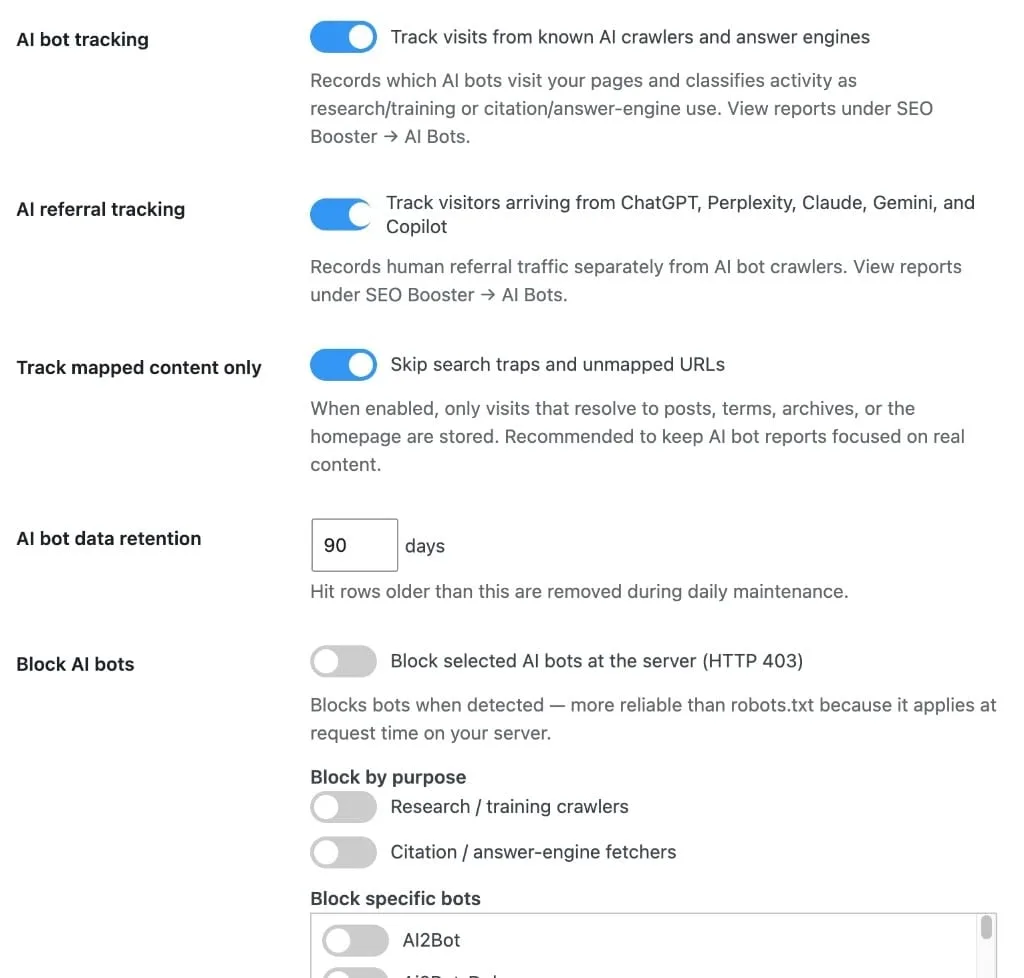
Settings → AI / LLM:
- Enable AI bot blocking
- Select purposes (research/training, citation/answer engine) and/or individual bots under Block specific bots
Blocking is configured in Settings only. The AI Bots report page shows tracking and an upgrade notice for free installs; it does not manage the block list.
Block list visit stats (Pro)
Under Block specific bots, each row shows Visits and Latest visit for that crawler:
- Counts load on demand when the list is visible (Pro-only AJAX)
- After load, rows sort by activity (most visits first)
- Show only bots that have visited filters the list (disabled until counts finish loading; the filter stays off if the first load fails until a retry succeeds)
Use visit stats to decide which bots are worth blocking before you save.
Behavior
When a blocked bot matches, SEO Booster responds with 403 and does not record a normal content hit for that request.
Tracking remains useful on free installs to decide whether blocking is warranted before upgrading.
Browse topics