
Dashboard
SEO Booster → Dashboard is the first screen after install. Connect Google Search Console, then monitor 30-day KPIs, the GSC chart, top keywords, open SEO Possibilities, and quick links to every major module.
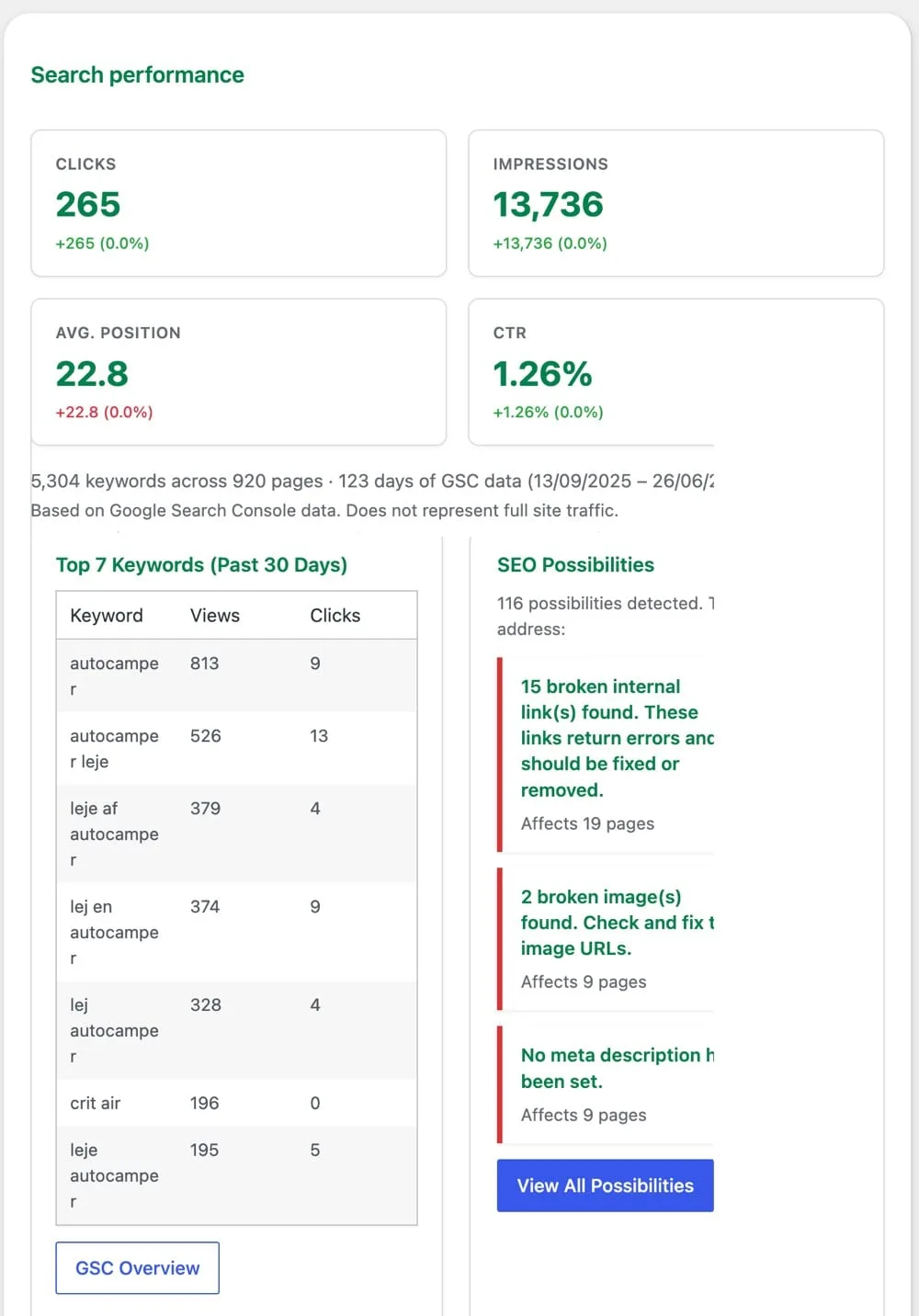
Part of the seo booster plugin.
Works with your SEO plugin, and makes it smarter.
Keep the SEO plugin you already use. We add Search Console context, a clear fix list, automatic links, and tools that write into the meta you already have. Works with Yoast, Rank Math, AIOSEO, SEOPress, and TSF.
- Yoast SEO
- Rank Math SEO
- All in One SEO (v4+)
- SEOPress
- The SEO Framework (v5+)
Sitewide snapshot in one view
What is it?
KPI scorecards, a GSC performance chart, top keywords, and module links on the first admin screen after install.
Who is it for?
Anyone who wants a daily SEO pulse before diving into GSC Overview, SEO Possibilities, or Tools.
What does it solve?
Opening five admin pages to see trends, open issues, and where to click next.
Dashboard sections
Search performance KPIs
Four scorecards compare the latest 30 days to the prior 30 days with absolute and percentage deltas.
Working area cards
Top keywords and SEO Possibilities side by side: jump to GSC Overview or the full issues list.
Module cards
Automatic Links rule count, AI Bots 30-day summary, Tools quick-win counts, and AI Credits balance when Credits is selected.
What each dashboard panel shows
KPI row and chart
Requires a connected Google Search Console property with imported data.
- Impressions, Clicks, CTR, Average position: each with vs previous 30 days delta
- Summary sentence below KPIs describing overall direction
- GSC chart: impressions and clicks over the reporting window
- Note: metrics reflect GSC data, not full analytics
Top keywords and SEO Possibilities
Two-column working panel.
- Top 7 Keywords (Past 30 Days): keyword, views (impressions), clicks; button to GSC Overview
- SEO Possibilities: total open issues with critical/error/high breakdown; link to full list
- Weekly email signup prompt when not yet confirmed
Secondary module cards
Quick stats and deep links.
- Automatic Links: count of active rules; Manage links button
- AI Bots: 30-day visits, mapped content %, research vs citation counts, top crawled pages; View AI Bots report
- Tools quick wins: images missing alt, posts missing SEO meta; Open Tools
- AI Credits: remaining balance when Credits provider is selected (links to AI settings)
Quick links and GSC connect
Footer navigation and onboarding.
- Quick links: GSC Overview, Front page keywords (frontend), SEO Possibilities, Automatic Links, Tools
- GSC not connected: connect panel with site picker and import status
How to use the dashboard
Connect Search Console first
Follow the connect panel if KPIs are empty. Wait for initial import (up to 90 days of history).
Read KPI deltas
Check whether impressions and clicks improved vs the prior 30-day window before diving into details.
Open GSC Overview for depth
Use Top Keywords as a teaser; GSC Overview has full filters and every keyword–page pair.
Clear SEO Possibilities
When the Possibilities card shows critical items, open the list and filter by severity.
Check module cards weekly
AI Bots spikes and Tools quick-win counts hint when to open those reports.
Frequently Asked Questions
Where is the dashboard?
SEO Booster → Dashboard (`admin.php?page=sb2_dashboard`). Default landing page for the plugin menu.
Why are KPIs empty?
Google Search Console is not connected, import is still running, or no GSC data exists for the selected property yet.
What period do KPIs use?
Latest 30 days compared to the previous 30 days, aligned with GSC import offsets for reporting delay.
Is the chart the same as Search Console?
It charts imported GSC history stored in SEO Booster: same underlying data, refreshed daily after import.
What is Front page keywords?
Quick link opens the frontend home URL with SEO Booster keyword details overlay (when logged in as admin).
Boost your rankings with smarter SEO
Connect Google Search Console, fix pages from real search data, automate internal links, and use AI when the repetitive work piles up.
Get Started