
Content Decay in WordPress (Find Pages Losing GSC Clicks)
Detect content decay in WordPress with SEO Booster Pro Tools: pages losing Search Console clicks over 30 days, plus a fix workflow tied to declining keywords.
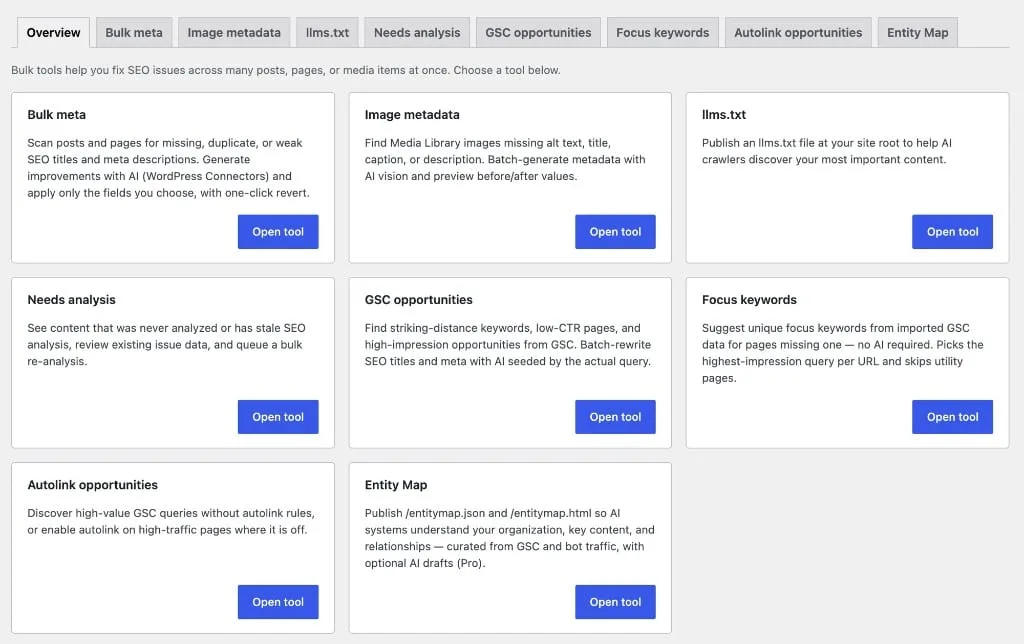
Quick answer: Content decay is when pages lose search clicks over time. In SEO Booster Pro, open Tools → Content decay to scan URLs where GSC clicks fell comparing the latest 30 days to the prior 30 days. Refresh content, fix snippets, and rebuild internal links, then watch GSC for recovery. Pair with declining keywords for query-level alerts.
Content decay is maintenance, not a penalty. Google did not necessarily demote you. Often the page simply stopped matching what searchers want.
Content decay vs related signals
| Signal | Level | Tool / guide |
|---|---|---|
| Content decay | URL losing clicks | Pro Tools → Content decay |
| Declining keywords | Query slipping | GSC Overview, declining keywords |
| Lost keywords | Query near-zero vs history | Reviving lost keywords |
| Needs analysis | Never analyzed / stale scan | Tools → Needs analysis (Pro) |
| Stale GSC terms | Query not seen 30+ days | GSC Overview → Keywords Not Seen |
Use Content decay when you want a URL maintenance queue from click trends. Use declining keywords when a specific term still matters and you need query context.
How SEO Booster finds decaying pages
- Import and sync Search Console data.
- Open SEO Booster → Tools → Content decay (Pro).
- Run scan to list URLs where clicks dropped between the two 30-day windows.
- Sort by former clicks or impressions to prioritize revenue or traffic pages.
- Optional: watch the weekly SEO report Also this week block for the same signals.
Fix workflow (per decaying URL)
- Confirm the URL should stay. If a stronger page should own the topic, merge and 301 redirect instead of patching weak copy.
- Check the snippet. Weak CTR at stable position → CTR improvement before rewriting body copy.
- Update content. Fresh intro, current year, new examples, FAQ section, better H2s aligned to GSC queries for that URL.
- Run SEO analysis in SEO Possibilities for open technical issues.
- Rebuild internal links from related posts; use Automatic Linking for recurring terms.
- Re-check GSC in 28 to 56 days. Persistent losers may need the lost keyword recovery playbook.
When decay is expected
- Seasonal pages (tax guides, event dates) after the season ends.
- Product pages for discontinued SKUs (redirect instead).
- News posts intentionally time-bound (archive or noindex if appropriate).
Do not refresh forevergreen URLs on autopilot without checking SERP intent.
Free alternative path
Without Pro, approximate decay detection:
- GSC Overview → Keywords Not Seen (Over 30 Days).
- Compare dashboard chart week over week via weekly email.
- Read declining keywords for query-level triage.
Pro Content decay saves time by grouping URL click drops in one scan.
Related Pro Tools
- GSC opportunities: batch meta fixes for low CTR clusters on the same URLs.
- Needs analysis: queue pages that never received full SEO review.
- Autolink opportunities: route internal links after you refresh cornerstone content.
Docs: Pro Tools overview · Tools feature page
Content decay turns Search Console history into a scheduled refresh list. Scan monthly, fix the URLs that still matter, and keep click trends from becoming full ranking losses.
Frequently asked questions
What is content decay in SEO?
When URLs that used to earn search clicks gradually lose traffic, often because content ages, competitors publish fresher answers, or intent shifts. It is measured at the page level, not one query at a time.
How does SEO Booster detect content decay?
Pro Tools → Content decay compares GSC clicks for each URL over the latest 30 days versus the prior 30 days and lists pages with meaningful declines. The weekly email Also this week section can link there when signals exist.
Is content decay a free feature?
No. Content decay is a Pro Tools tab. Free installs still see declining query patterns in GSC Overview and the declining keywords workflow.
How is content decay different from Needs analysis?
Content decay uses Search Console click trends per URL. Needs analysis finds pages never analyzed, stale after 90+ days, or with open SEO Possibilities regardless of GSC movement.
How is content decay different from declining keywords?
Declining keywords track query-level slips in reports and email. Content decay queues URLs losing clicks so you refresh or merge whole pages.
On this page