
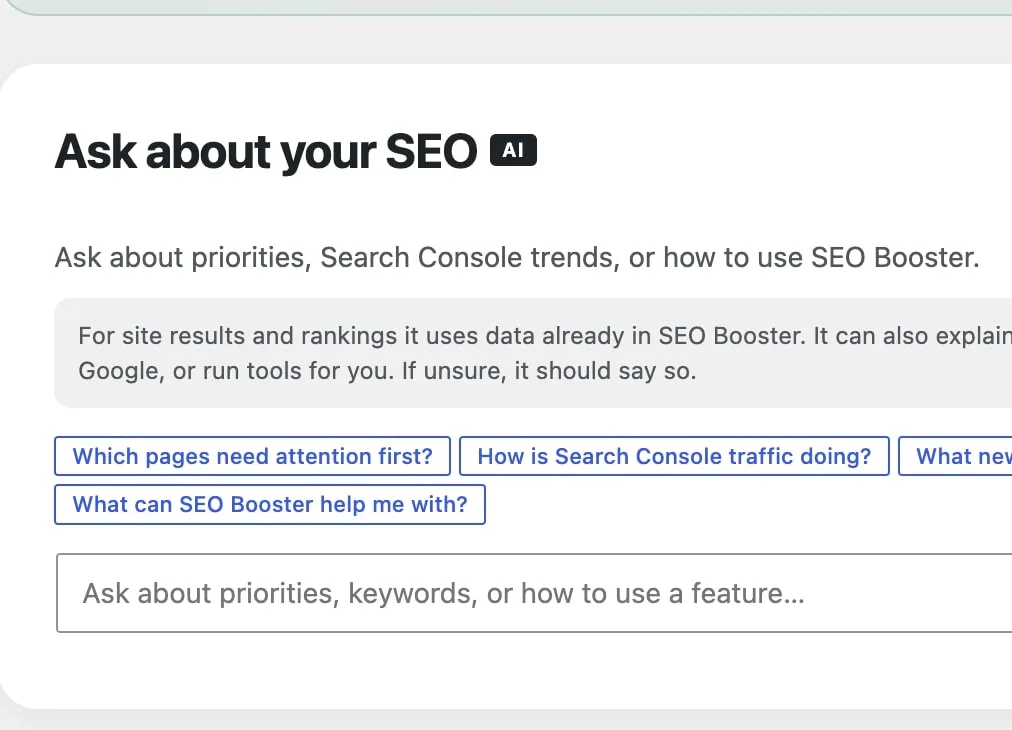
Ask about your SEO
Ask from the Dashboard when you need site priorities (Pro), or from the edit screen when you are working on one page (free). Choose WordPress Connectors or prepaid SEO Booster Credits for the AI provider. Answers draw on Search Console data, SEO analysis, and a short product handbook, then point you to the right next step.
Part of SEO Booster.
Works with your SEO plugin, and makes it smarter.
Keep the SEO plugin you already use. We add Search Console context, a clear fix list, automatic links, and tools that write into the meta you already have. Works with Yoast, Rank Math, AIOSEO, SEOPress, and TSF.
- Yoast SEO
- Rank Math SEO
- All in One SEO (v4+)
- SEOPress
- The SEO Framework (v5+)
Dashboard Ask is Pro. Editor Ask is free.
What is it?
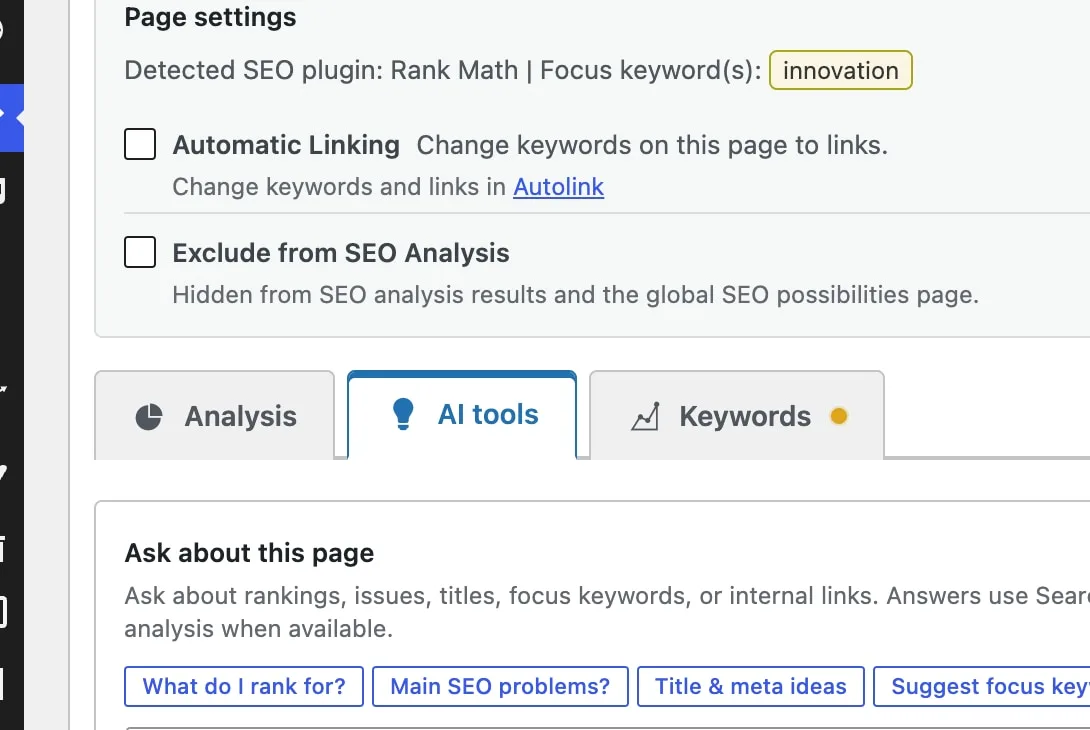
Two related advisors. On the Dashboard, Ask about your SEO (Pro) covers site priorities, traffic, keywords, content ideas, and how SEO Booster works. On posts and pages, Ask about this page is free and answers ranking, issues, titles, focus keywords, and internal links for that URL.
Who is it for?
Anyone using Connectors or Credits who wants page-level help in the editor, and Pro users who want a site-wide starting point before opening Tools or SEO Possibilities.
What does it solve?
Guessing which page to fix first, digging through docs for Entity Map or llms.txt, or switching tabs when you only need a quick title, keyword, or link idea for the page you are editing.
What you get in Beta
Dashboard and edit screen
Site-wide Ask on the Dashboard (Pro). Ask about this page under AI tools in the SEO Booster metabox on posts and pages (free with Connectors or Credits).
Chips plus free text
Suggested questions for priorities, traffic, keywords, titles, and plugin howto, plus your own wording.
Grounded in your data
Site answers use Search Console KPIs and SEO Possibilities. Page answers use that page’s keywords and analysis when available.
Prioritized next steps
When relevant, you get short lists with why they matter, tool links, and on the Dashboard edit or view links for suggested pages.
How Ask about your SEO works
Ask on the Dashboard
Path: SEO Booster → Dashboard. The Ask about your SEO panel sits above Here’s what to do next. Expand it anytime, or open #ai. Free shows an Upgrade card that links to pricing.
- Chips for priorities, traffic, new keywords, content ideas, and plugin help
- Recent answers stay available so you can reload the last few
- Suggested pages link to edit or view when they match your data
Ask about this page in the editor
Path: edit any post or page → SEO Booster metabox → AI tools. Ask about this page uses that URL’s Search Console keywords and SEO analysis.
- Chips for rankings, SEO problems, title and meta ideas, focus keyword, and internal links
- Stays in the editor so you can apply ideas while you write
- Uses that page’s Search Console keywords and analysis when they are available
What Ask uses
Ask answers from data already in SEO Booster: Search Console, SEO analysis, and a short product handbook. It points you to the next step. It does not crawl live pages or run Tools for you.
- Works with WordPress Connectors or SEO Booster Credits under Settings → AI/LLM
- More cautious answers when data is thin, or the question is outside the product
- If you ask for something the plugin cannot do, Ask says so and points you to support
Try it in three steps
Choose your AI provider
Choose WordPress Connectors (WordPress 7+) or connect SEO Booster Credits under SEO Booster → Settings → AI/LLM.
Open Ask on the Dashboard or a page
On the Dashboard, expand Ask about your SEO (or open
Ask a chip or type a question
Start with pages that need attention, or ask for title ideas on the page you are editing, then follow the links.
Frequently Asked Questions
Is Ask about your SEO Pro-only?
Dashboard Ask requires Pro. Free installs see an Upgrade card that links to pricing. Ask about this page on the edit screen is free with either Connectors or Credits. Applying a focus keyword or autolink from those answers is Pro.
Do I need WordPress Connectors?
No. Choose WordPress Connectors (WordPress 7+) or connect SEO Booster Credits under SEO Booster → Settings → AI/LLM.
Will it invent rankings or URLs?
Site metrics and page lists should come from data already in SEO Booster. If data is missing, it should say so instead of inventing numbers.
What is the difference between Dashboard Ask and Ask about this page?
Dashboard Ask is for site priorities, trends, and plugin howto. Ask about this page is scoped to the post or page you are editing (rankings, issues, titles, focus keyword, internal links).
Why is it marked Beta?
We are improving answers from real questions. If something should be covered and is not, contact support so we can extend the handbook and data packs.
Boost your rankings with smarter SEO
Connect Google Search Console, fix pages from real search data, automate internal links, and use AI when the repetitive work piles up.
Get Started