
Weekly SEO Report for WordPress from Search Console Data
What arrives in the SEO Booster weekly email, how to act on each section, and how to enable Search Console reports in WordPress without daily GSC logins.
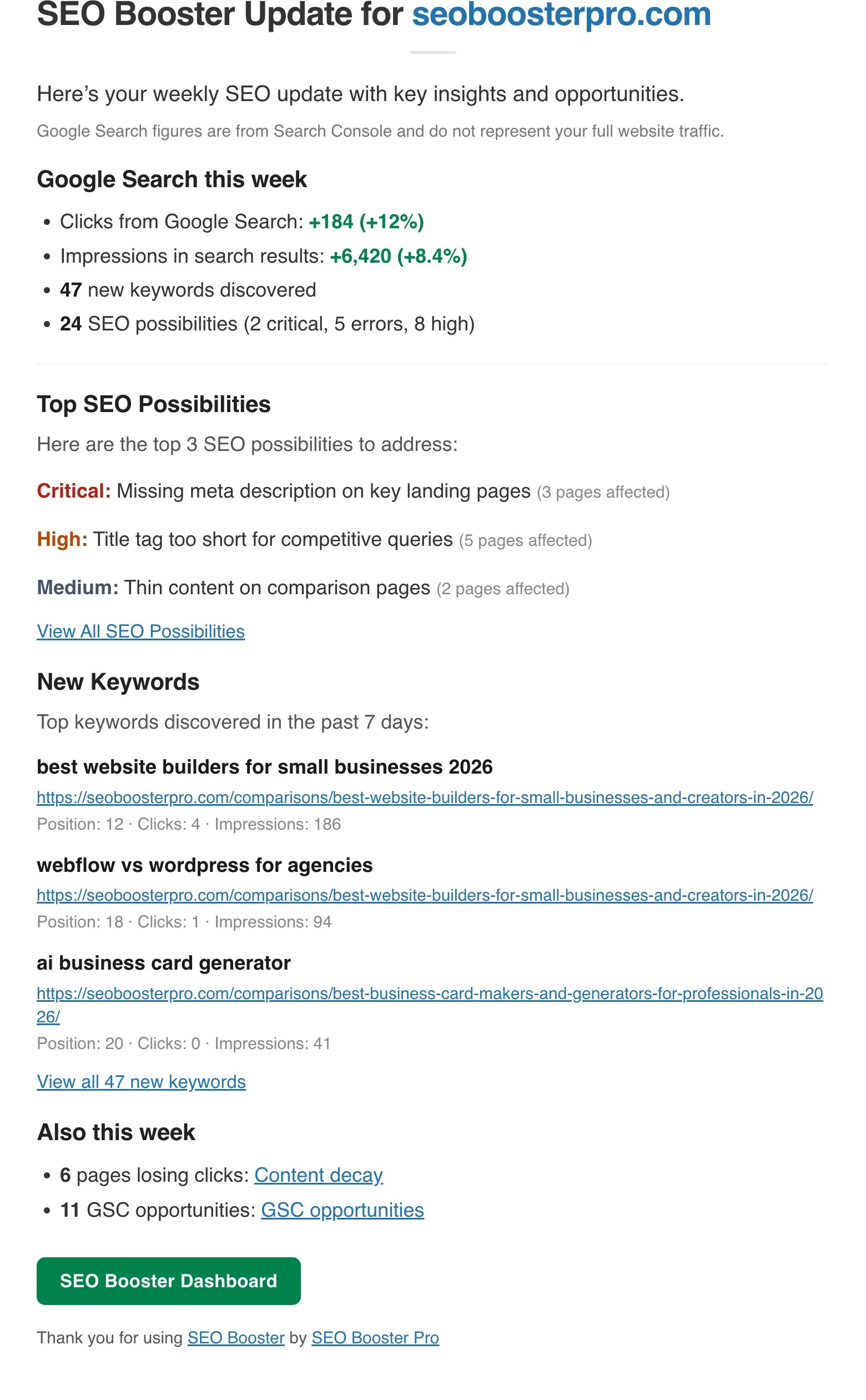
Quick answer: The SEO Booster weekly SEO report is an email digest of Search Console movement, open SEO Possibilities, new keywords, and (on Pro) Tools alerts. Enable it under Settings → Email & Reports, skim each section weekly, and click through to WordPress only when something needs action. For the full keyword report map, see SEO keyword reports in WordPress.
What arrives each week
The current template includes (when data is available):
- Google Search this week: Week-over-week clicks and impressions (latest 7 days vs prior 7 days), plus counts for new keywords and open SEO Possibilities.
- Top SEO Possibilities: Up to three high-impact issues with severity and affected page counts.
- New Keywords in the Past 7 Days: Up to three examples with landing page, position, clicks, and impressions.
- Also this week (Pro): Links to Content decay and GSC opportunities in Tools when those signals exist.
Full doc: Understanding your weekly email report
How to act on each section
| Email section | What it means | Where to click | Next step |
|---|---|---|---|
| Google Search this week | Direction of search traffic | Dashboard or GSC Overview | If clicks fall while impressions hold, check CTR improvement and declining keywords |
| Top SEO Possibilities | Sitewide on-page or GSC issues | SEO Possibilities list | Fix Critical/High items first; re-analyze affected URLs |
| New keywords (7 days) | Fresh ranking footholds | GSC Overview (linked) | Expand content or add internal links; see discovering new keywords |
| Also this week → Content decay (Pro) | URLs losing clicks over 30 days | Tools → Content decay | Refresh or merge pages; see content decay guide |
| Also this week → GSC opportunities (Pro) | Low CTR or striking-distance clusters | Tools → GSC opportunities | Batch-rewrite meta for affected URLs |
Treat the email as a triage queue, not the full analysis workspace. Deep work still happens in GSC Overview, the editor metabox, and Tools.
Enable and configure
- SEO Booster → Settings → Email & Reports.
- Turn on weekly email and add recipient addresses.
- Confirm GSC is connected and syncing (Dashboard status).
- Optional: adjust which address receives copies for clients or teammates.
Feature overview: Weekly email report
Pair with keyword reporting
The weekly email highlights changes. The keyword reporting map explains every report type when you need detail beyond the digest:
- New vs declining vs lost keywords
- Top performers and improvement potential
- Cannibalization and long-tail filters
- Per-URL metabox keyword tables
What the weekly report does not include
- Cannibalization tables as a dedicated email section (use GSC Overview dots or cannibalization doc).
- 404 monitoring (Pro plugin screen, not the weekly template today).
- Full Analytics traffic (Search Console search data only).
Build a weekly habit (15 minutes)
- Skim Google Search this week for direction.
- Open one Top SEO Possibility and fix or assign it.
- Pick one new keyword worth expanding.
- On Pro, check Also this week for decay or GSC batch jobs.
- Log baseline metrics in GSC if you changed titles or major content.
Consistent small actions beat monthly deep dives. The weekly SEO report exists so you notice movement before rankings slip hard.
Frequently asked questions
Does SEO Booster send a weekly SEO report?
Yes. Enable it under SEO Booster → Settings → Email and Reports. The email summarizes imported Search Console movement, top SEO Possibilities, new keywords, and on Pro optional Tools signals.
Is the weekly SEO report free?
The core weekly email (Search Console pulse, SEO Possibilities, new keywords) is free. Pro adds an Also this week block for content decay and GSC opportunities when those signals exist.
Does the weekly report use Google Analytics?
No. Figures come from imported Google Search Console data (clicks and impressions in search results), not full site analytics or server logs.
Can I send the report to multiple people?
Add recipient addresses in Settings → Email and Reports. Each inbox gets the same digest for the connected property.
What if a section is empty?
Sections appear only when data exists. A quiet week may show stable Search Console stats with no new keywords or open Possibilities flagged as top priority.
On this page