
Automatic Internal Linking for WordPress
Set up SEO Booster Automatic Linking: keyword-to-URL rules, per-post enable, limits, cannibalization guardrails, and Pro bulk controls for WordPress sites.
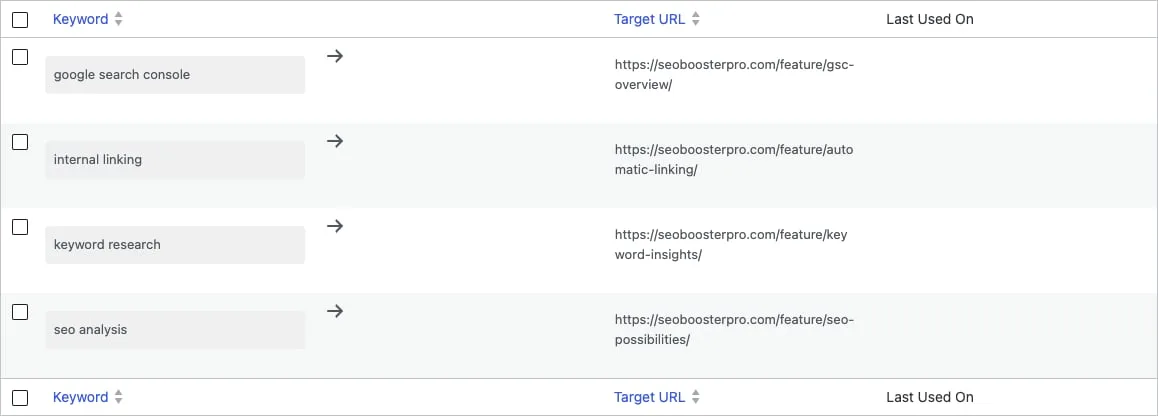
Quick answer: Automatic internal linking in WordPress with SEO Booster means creating keyword→URL rules under Automatic Links, enabling autolink on chosen posts (_sbp-autolink), and letting the plugin insert links in rendered HTML when phrases match. Start with cornerstone pages, avoid cannibalization, and use Pro bulk tools on large sites. Overview: Automatic Linking feature.
Manual internal links do not scale on content-heavy sites. Automatic linking adds contextual anchors without editing every paragraph by hand.
How automatic linking works
- You define a keyword phrase and target URL in SEO Booster → Automatic Links.
- You enable autolink on specific posts or pages (per-post setting).
- On the frontend, when that page is viewed, matching phrases in the rendered HTML become links (subject to limits and skip rules).
- Last Used On shows recent URLs where each keyword matched.
Docs: How automatic links work
Setup checklist
- Pick cornerstone URLs for each topic cluster (one preferred page per money phrase).
- Add keyword rules with descriptive phrases, not single generic words (
wordpress seo pluginbeatsseoalone). - Enable autolink on posts that should receive replacements (not sitewide on every URL unless intentional).
- Preview the live page after saving. Builder previews in admin may differ from rendered output.
- Review Last Used On weekly to catch unexpected matches.
Cannibalization guardrails
Automatic links can split authority if several URLs target the same query.
- Route each important phrase to one cornerstone URL.
- Use prevent keyword cannibalization habits: prefer links from supporting posts to the hub page.
- Watch GSC Overview for yellow/green dots on the Query column (cannibalization guide).
- Avoid creating rules that compete with pages already ranking for the same intent.
When in doubt, link manually on high-traffic posts and automate only stable, non-overlapping phrases.
Limits and skip behavior
SEO Booster skips autolink processing on many non-content requests (REST, feeds, search, admin, etc.) and only runs on singular views where autolink is allowed. Practical tips:
- Do not rely on autolink inside navigation or footer boilerplate you cannot control.
- Test WooCommerce product and category templates on the frontend.
- If a phrase appears inside headings you do not want linked, adjust the keyword phrase or edit manually.
Troubleshooting: Why are keywords not linking automatically?
WooCommerce and ecommerce sites
For stores, route buying-intent phrases to product or category URLs. See internal linking for high-margin products and ecommerce internal linking strategies.
Pair GSC data with autolink: find posts with impressions for commercial queries, then add rules pointing to the right SKU or collection.
Pro conveniences
SEO Booster Pro adds operator shortcuts:
- Autolink column on the post list with quick edit enable/disable (Pro autolink on post list).
- Bulk enable/disable autolink on many posts at once.
- GSC metabox autolink status and create-links actions for high-value queries.
- Tools → Autolink opportunities to batch-create rules from GSC gaps (Pro Tools).
Automatic vs manual linking
| Approach | Best for |
|---|---|
| Manual links in body copy | Cornerstone guides, exact anchor control, high-trust CTAs |
| Automatic keyword rules | Recurring product names, glossary terms, stable topic phrases |
| Hybrid | Manual on top posts + automation for long tail across archives |
Read the broader strategy in the power of internal linking.
Measure impact
After adding rules, watch in Search Console:
- Clicks and impressions on target URLs (not only the linking posts).
- Whether supporting posts maintain rankings (over-linking can look spammy).
- Cannibalization signals if a new rule steers traffic away from the wrong page.
Automatic internal linking is a scale tool, not a set-and-forget SEO trick. Curate rules, enable autolink deliberately, and prune rules when site structure changes.
Frequently asked questions
What is automatic internal linking in WordPress?
Keyword-to-URL rules that insert internal links when matching phrases appear in rendered page HTML on posts where autolink is enabled. SEO Booster runs at output time, not inside the block editor.
Does automatic linking work with page builders?
Linking uses rendered HTML from the public page, including common page builders and WooCommerce. There is no in-editor integration for Elementor, Beaver Builder, or Divi. Preview the live page to verify links.
Can automatic links hurt SEO?
Yes, if every mention links everywhere or multiple URLs compete for one query. Use one cornerstone URL per topic, cap replacements per page, and monitor cannibalization.
Is Automatic Linking free?
Core keyword rules and per-post enable are free. Pro adds the post list Autolink column, bulk enable/disable, and autolink status in the GSC keyword metabox.
How is this different from related posts plugins?
Related posts plugins show a widget or footer list. Automatic linking weaves contextual anchors inside body copy where the phrase naturally appears, similar to manual editorial links at scale.
On this page