
Settings page
SEO Booster Settings, seven tabs for AI/LLM, Automatic Links, Email, Google Search Console, SEO Possibilities, Tools, and Stats.
Path: SEO Booster → Settings (admin.php?page=sb2_settings)
Save changes with the primary Save Settings button at the bottom. Seven tabs organize options:
| Tab | Topics |
|---|---|
| AI/LLM | AI provider, Credits, AI bot tracking, AI referral tracking, retention, Pro bot blocking |
| Automatic Links | Global enable, repeat keywords, capitalization, max links, excluded elements |
| Weekly reports and recipients | |
| Google Search Console | Property, refresh, import status |
| SEO Possibilities | Auto-scan enable, frequency, batch size |
| Tools | Database update, maintenance buttons, delete-on-deactivate |
| Stats | Database sizes, cron, Action Scheduler, cache, full guide |
See also automatic linking, SEO Possibilities, and Tools.
AI / LLM tab
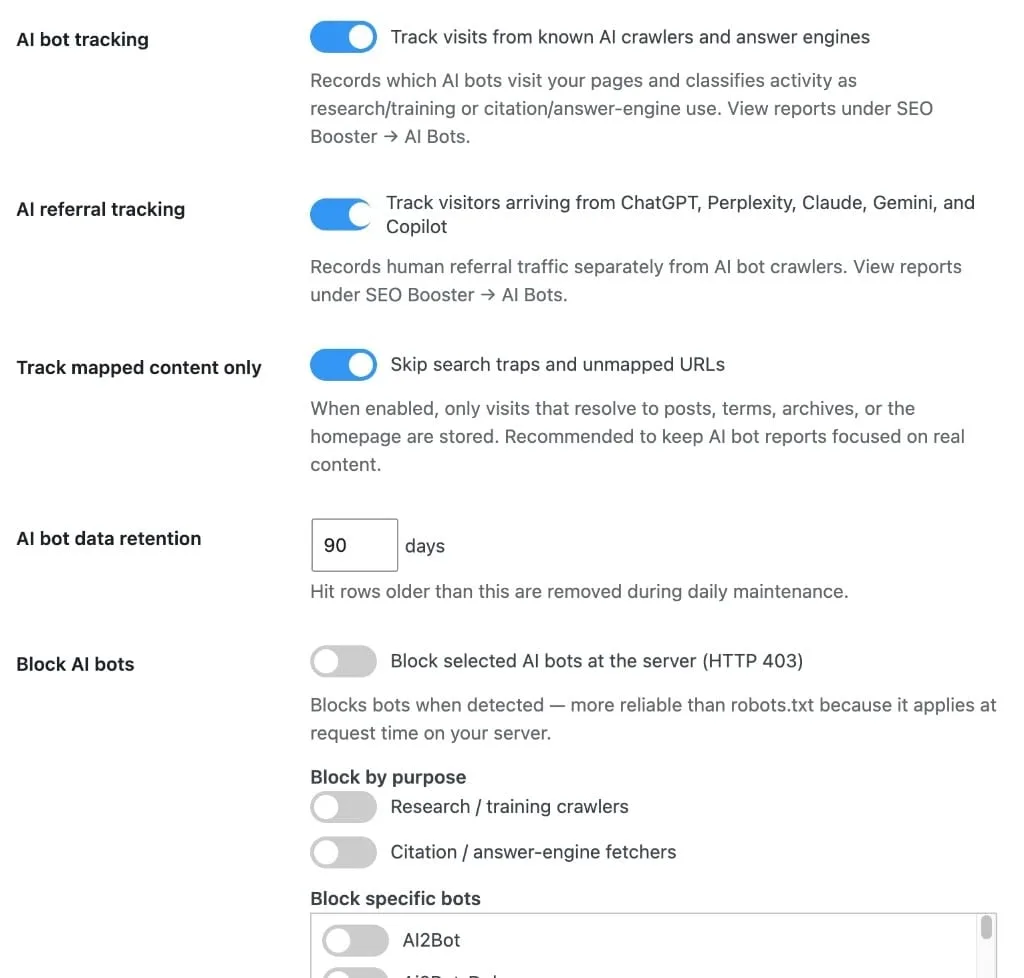
| Setting | Description |
|---|---|
| AI provider | Disabled, WordPress Connectors, or SEO Booster Credits |
| Credits register / balance | When Credits selected, register, refresh, sync purchases |
| AI bot tracking | Enable/disable crawler logging |
| Track mapped content only | Default on, noise buckets to Noise tab |
| Retention days | 7–365 days of hit storage. 30–60 days is usually enough; see Stats for table sizes |
| Pro: AI bot blocking | Block selected bots or purposes (403). Block list shows per-bot visit counts and latest visit (loaded on demand) |
See AI and Credits.
Email & Reports tab
| Setting | Description |
|---|---|
| Weekly Email Reports | Enable/disable weekly digest |
| Email recipient(s) | One address or comma-separated list |
| Send Email Now | Trigger immediate send (also in Tools section on some builds) |
See weekly email feature.
Automatic Links tab
| Setting | Description |
|---|---|
| Enable automatic linking | Global on/off for the autolink engine |
| Repeat keywords | Link all occurrences vs first only |
| Match capitalization | Case-sensitive keyword matching |
| Max links per post | Cap injected links per page (1–99) |
Per-post enable remains in the SEO Booster metabox Page settings → Automatic Linking (_sbp-autolink).
Google Search Console tab
- Connected property and site picker
- Manual data refresh button
- Change GSC site
- Import status and progress indicators
See GSC data refresh.
SEO Possibilities tab
| Setting | Description |
|---|---|
| Auto-scan enabled | Schedule analysis for GSC-discovered URLs |
| Frequency | How often auto-scan runs |
| Batch size | URLs processed per batch |
404 monitoring (Pro)
On the appropriate settings tab when Pro is active:
- Toggle 404 Error Monitoring, visitor-triggered 404 and redirect logging
See 404 feature page.
Tools tab
Maintenance actions (database update, keyword rescan, debug log reset, full data wipe, delete-on-deactivate). Destructive buttons show a confirmation modal.
Full button reference: Settings Stats and Tools tabs.
Plugin error messages live in SEO Booster → Debug Log (sb2_log). Reset SEO Booster Debug Log on this tab clears that table: not WordPress wp-content/debug.log.
Browse topics