Knowledge Base

SEO analysis overview

When editing a page with SEO Booster installed you can scroll down to the metabox named “SEO Booster”

The SEO Analysis feature provides comprehensive SEO testing for your content, analyzing everything from basic SEO elements to advanced technical SEO factors and Google Search Console insights.
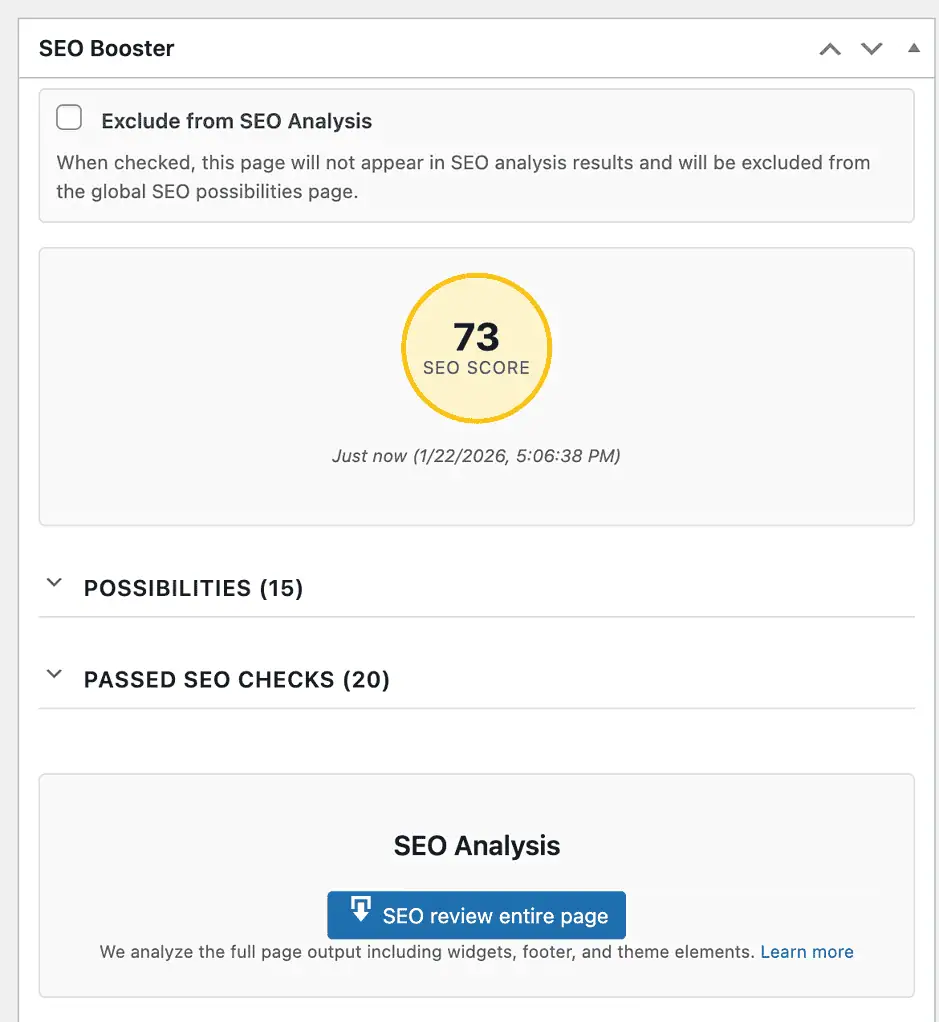
Screenshot of SEO Booster metabox with a score of 73
Explore the SEO Booster feature for effective page analysis. Check your SEO score and improve your site’s performance.

SEO Score

At the top of the metabox, you’ll see a circular score indicator showing your overall SEO score as a percentage. The score is color-coded:

  • Green (80-100%) – Excellent SEO optimization
  • Yellow (60-79%) – Good, with room for improvement
  • Red (0-59%) – Needs significant SEO work

The score is calculated based on all the SEO tests performed and gives you a quick overview of how well-optimized your page is.

Analysis Results

Below the score, you’ll see the analysis results organized into three categories:

Possibilities (Issues & Improvements)

This section shows all the SEO issues and improvement opportunities found during analysis. Items are marked with different severity levels:
  • Error/Critical – Critical issues that need immediate attention (e.g., missing title, noindex set)
  • Warning – Important issues that should be addressed (e.g., focus keyword not in title)
  • Low/Improvement – Suggestions for optimization (e.g., content could be longer)

Good

This section highlights what you’re doing well. These are positive SEO elements that are properly implemented on your page.

Running an Analysis

To analyze your page, click the “SEO review entire page” button. This will:

  • Download the full rendered page (including widgets, footer, and theme elements)
  • Run comprehensive SEO tests on the complete page output
  • Display all findings in the results section

The analysis includes both the post content and the full page as it appears to visitors and search engines. This ensures that all SEO elements are properly detected, including those added by your theme or plugins.

What Gets Checked

The SEO Analysis performs over 40 different tests, organized into these categories:

Basic SEO Elements

Title tag, meta description, focus keyword usage, and noindex status

Content Quality

Content length, heading structure (H1, H2, etc.), keyword density, and readability

Technical SEO

Image ALT text, internal and external links, broken links, structured data, canonical URLs, robots meta tags, and more

Social Media & Sharing

Open Graph tags, Twitter Cards, and social sharing optimization

Google Search Console Integration

If you have Google Search Console connected, the analysis includes insights such as:
  • Keywords with low click-through rates despite good positions
  • High impressions but low clicks
  • Keywords not found in your content
  • Keyword cannibalization opportunities
  • Long-tail keyword opportunities
  • Content freshness recommendations
  • Question-based queries
For a complete list of all tests performed, see: Complete List of SEO Tests


Old Results & Reanalysis

When you open a page that has been analyzed before, SEO Booster automatically loads the previous analysis results. This means you can see your SEO score and issues immediately without waiting for a new analysis.

Content Change Detection

If you’ve made changes to your page content after the last analysis, you’ll see a yellow notice banner that says:
Content has changed. Click to reanalyze.
Click the “Reanalyze” button in the notice to run a fresh analysis with your updated content. This ensures your SEO score and recommendations are always based on the current version of your page.


Bulk Analysis

You can analyze multiple posts or pages at once using the bulk action feature:

  1. Go to Posts or Pages in your WordPress admin
  2. Select the posts/pages you want to analyze (check the boxes next to them)
  3. Choose “SEO Analysis (SEO Booster)” from the Bulk Actions dropdown
  4. Click “Apply”

A progress indicator will appear at the top of the page showing the analysis progress. The system will analyze each selected post/page in the background, and you can continue working while the analysis runs.

Note: Only posts that are not excluded from analysis will be processed. Private posts and WooCommerce special pages (cart, checkout, etc.) are automatically excluded.


How to hide/show the metabox

You can choose whether or not to show the metabox. When in editing mode locate the “Screen Options” link up to the right of the page.
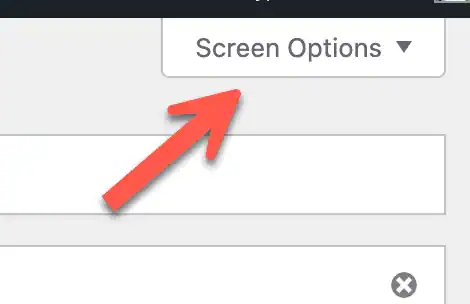
Arrow pointing to Screen Options in WordPress
The Screen Options menu allows you to hide/show metaboxes.

Understanding Your Results

For detailed information on interpreting your SEO analysis results and how to fix common issues, see: Understanding SEO Analysis Results

Boost Your Rankings with Smarter SEO


Experience effortless optimization, actionable insights, and automated tools, all designed to supercharge your WordPress site

Level Up Your SEO!
21 Days of Actionable Tips, One Email at a Time 📈

Sign up to receive daily, actionable strategies designed specifically for SEO Booster users, along with general SEO insights to help you dominate the search results.

  • Connect & Set Up: Connect Google Search Console and set up the plugin.
  • Dashboard Navigation: Explore your dashboard and detailed GSC insights.
  • Add Keywords: Easily add keywords for automatic internal linking.
  • Weekly Reports: Review weekly SEO reports for actionable insights.
  • Fix Cannibalization: Identify and resolve overlapping keyword usage.
  • Advanced Insights: Unlock detailed reports for deeper analysis.
  • SEO Knowledge Hub: Access expert SEO tips and track our journey.
  • Target Long-Tail Keywords: Optimize for niche keywords to boost conversions.
  • Improve CTR: Optimize meta tags to enhance click-through rates.
  • Resolve 404 Errors: Quickly identify and fix broken links.
  • Optimize Top Pages: Focus on enhancing your best-performing pages.
  • Revive Lost Keywords: Refresh content to regain lost traffic.
  • Tackle Keyword Decline: Address falling keyword performance.
  • Discover New Keywords: Expand your reach with emerging search terms.
  • Optimize Q&A: Target question-based queries for featured snippets.
  • Smart Internal Linking: Use advanced linking to fix cannibalization.
  • Uncover Long-Tail Opportunities: Find high-value niche keywords.
  • SEO Checklist: Ensure you cover all essential optimization steps.
  • Weekly Updates: Stay informed with regular performance reports.
  • Monitor SEO Progress: Check your growth and adjust strategies.
  • Enhanced Internal Linking: Strengthen site structure with optimized links.