
Track How AI Bots Use Your Website
See which AI systems read your pages, what they fetch, and where to improve—updated in real time.
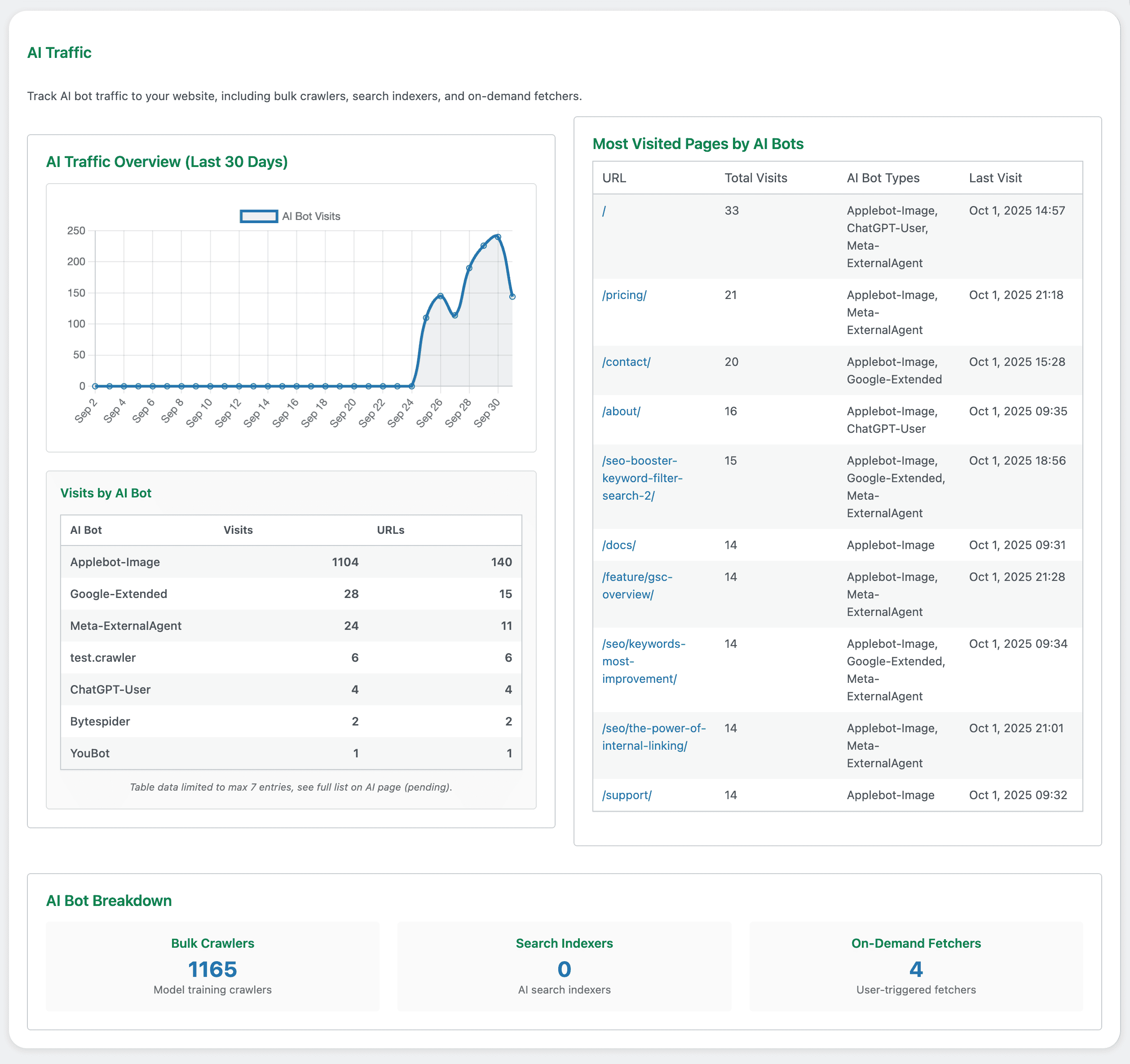
Understand AI demand – Know when model trainers, AI search engines, and assistants hit your site.
Prioritize what matters – Spot the pages assistants fetch for real users and polish them first.
Fix costly issues fast – Find AI‑visited URLs with 3xx/4xx/5xx responses and stop wasting crawl.
Tie activity to outcomes – Compare AI visits with Google Search Console metrics to guide strategy.
Private by design – Detection and storage happen locally on your site. Data never leaves your server.
What you get
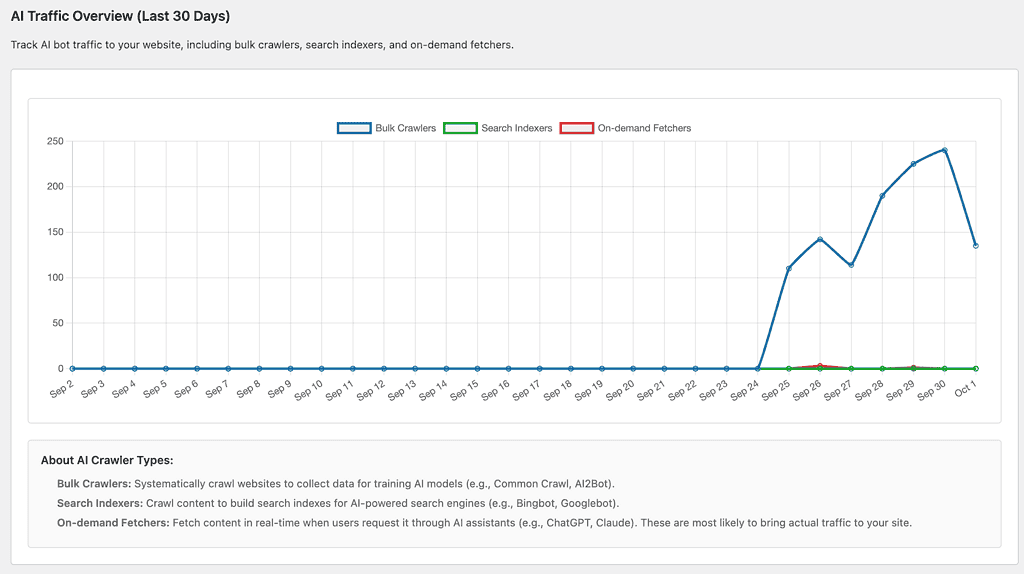
- 30‑day AI traffic trends by bot type (Bulk Crawlers, Search Indexers, On‑Demand Fetchers).
- Top AI bots and most visited pages by AI systems.
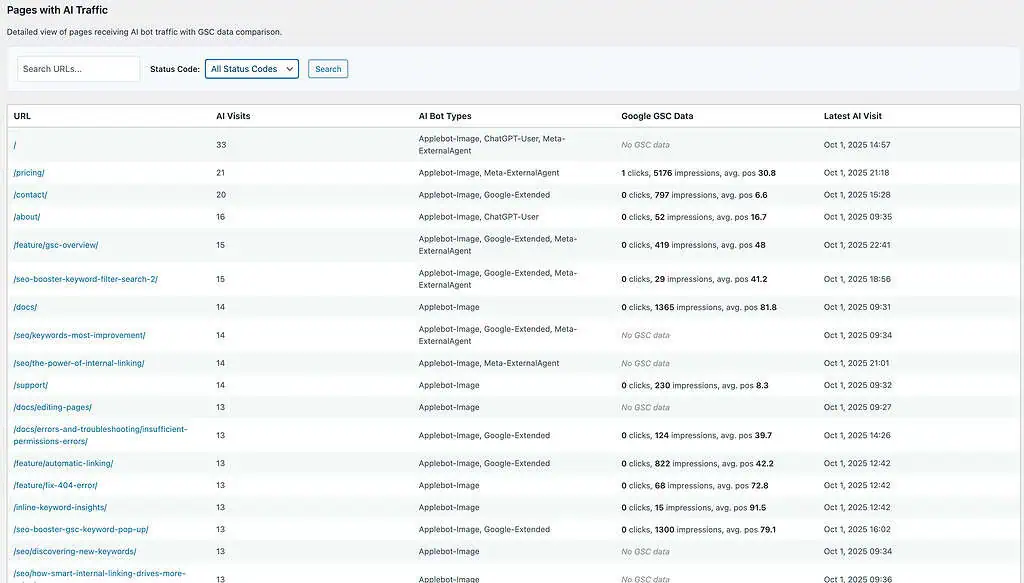
- Per‑page details with latest AI visit and GSC comparison (clicks, impressions, avg. position).
- Real‑time data capture; last 30 days retained.
- Fast filters for status codes (2xx, 3xx, 4xx+, 5xx+) and URL search.
Why this is useful
AI Traffic helps you see real interest, not guesses. When assistants repeatedly fetch a page, it’s a strong signal that people are asking about that topic right now. Those pages deserve quick attention: keep the copy accurate, trim the fluff, and make the key points easy to scan.
The module also highlights problems that quietly waste visibility. If AI bots are hitting redirects, 404s, or server errors, they’re less likely to rely on that content. Fixing broken links, tightening redirect chains, and resolving 5xx issues often restores trust quickly. You can then connect activity to outcomes by comparing AI visits with your Google Search Console data.
If a page gets a lot of AI interest but little search traction, it likely needs clearer structure (FAQ/HowTo), sharper titles and headings, or better internal links. All of this happens with privacy in mind: detection and storage stay on your server, and the data never leaves your site.
Common ways to use the AI Traffic information
Start with the pages assistants fetch most often. Add a short summary at the top that answers the core question, include a compact FAQ, and make next steps obvious with clear calls to action. For pages that indexers visit regularly, help them understand the content faster – use relevant schema, simplify headings, and add links to related resources.
If the report shows errors on AI‑visited URLs, fix those first; removing 4xx and 5xx responses usually delivers the quickest win. When you notice spikes from bulk crawlers, treat them like ingestion windows: double‑check that important pages are accurate, stable, and fast.
If your pricing page appears in assistant fetches every day, add a brief overview at the top and a few bite‑size FAQs that cover common concerns. If a help article receives AI visits but returns a 404, restore the content or redirect to the best current page so assistants can reference it again. If your guides are visited by AI indexers but GSC impressions remain low, add FAQ schema and link those guides from higher‑traffic pages to improve discovery.
SEO and content teams can plan updates around what people are actually asking assistants, instead of guessing. Web teams get a clear list of broken or redirected URLs that affect how AI systems consume the site. And anyone who needs a private, trustworthy view of AI activity can rely on the real‑time, on‑server data to see what’s happening without sending anything off‑site.
Frequently Asked Questions
Discover everything you need to know with a brief overview before diving into the details. Click on each section title for more insights and valuable information tailored to your needs.